Go To
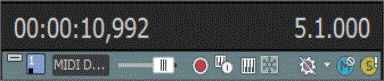
Use the Go To command to move the cursor to a specific location in your Acid project.
Double-click either of the fields in the Time Display window to type a value in the edit box. When you press Enter, the cursor will move to that position.
NOTE Notes:
-
When the timeline has focus, press Ctrl+G to type a Go To time in the right-hand field in measures.beats.ticks. Press Shift+G to type a Go To time in the left-hand field using the current time ruler format.
-
When the Chopper window has focus, press Ctrl+G to type a Cursor Position (or Selection Start time) in measures.beats.ticks. Press Shift+G to type a Cursor Position (or Selection Start time) using the current time ruler format.
Last modified on July 01, 2026
Was this page helpful?
What did you particularly like about this page?
What did you dislike about this page?
Thank you for your feedback.