Sidechaining
A very popular effect in dance productions is sidechaining. This means that a compressor is not controlled by its own input signal, but by a signal from another track. A typical application is that the audio signal from the kick drum is used for sidechaining a compressor to create additional "space" for the kick drum in the mix.
To setup sidechaining in the project:
-
In the track whose output is to be used as the control signal for the sidechaining, insert the SidechainSender plug-in.
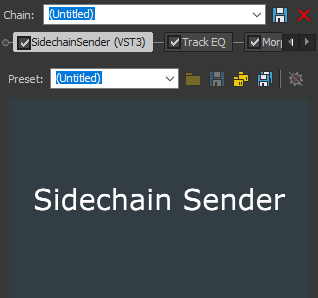
NOTE The position of the SidechainSender plug-in within the track's effect chain is taken into account. You can also move the plug-in in front of the equalizer (as shown in the picture) and use the signal not yet processed by the EQ as sidechain input.
-
Insert a sidechain-capable compressor plug-in into the track or bus whose dynamics you want to edit. You can, for example, use the eFX_Compressor plug-in provided.
-
In the mixer window, right-click on the insert FX in the corresponding channel strip and activate the sidechain input.
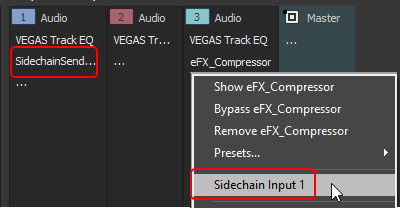
NOTE You can use any number of sidechain senders, they are numbered consecutively in the order in which they are inserted. However, you can't tell from the plugin in the source track which number it got, so we recommend you take notes.
Notes:
-
Sidechaining does not work with surround projects
-
With third-party compressor plug-ins, it is assumed that inputs 3/4 are the sidechain inputs.
Last modified on April 23, 2026
Was this page helpful?
What did you particularly like about this page?
What did you dislike about this page?
Thank you for your feedback.