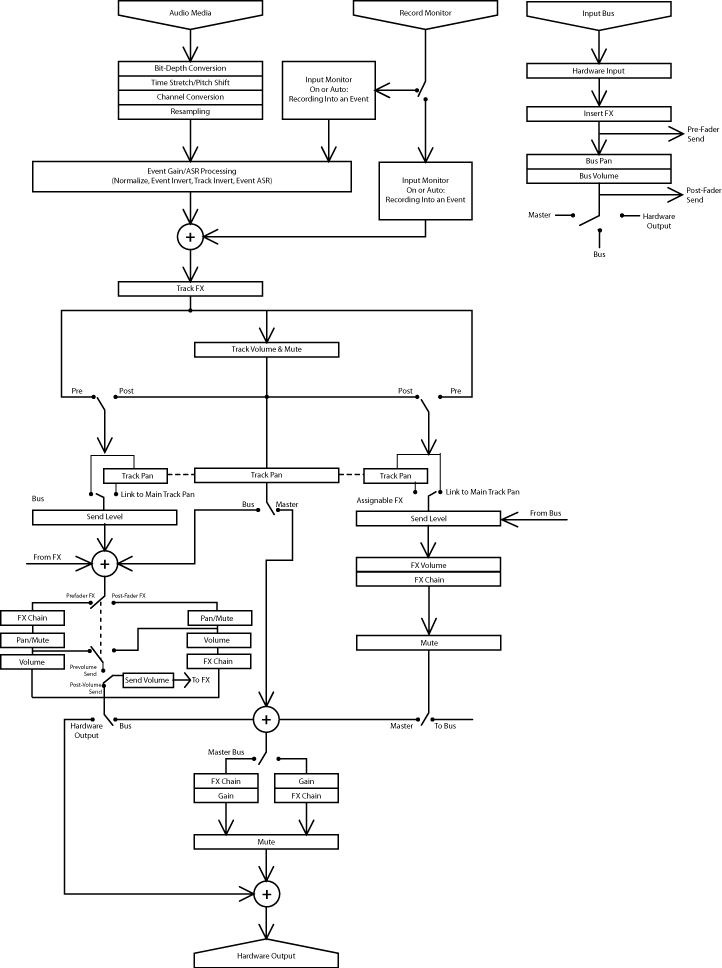
In 5.1 surround sound projects,
tracks routed to the Surround Master bus send surround panning (six-channel)
information. Tracks routed to busses (e.g., Bus A) send stereo panning
(two-channel) information.
Assignable effect chain panning
is available only in 5.1 surround sound projects. In 5.1 surround sound
projects, assignable effect chains routed to the Surround Master bus send
surround panning (six-channel) information. Assignable effect chains routed
to busses (e.g., Bus A) send stereo panning (two-channel) information.
Bus panning is available only in
5.1 surround sound projects. In 5.1 surround sound projects, busses routed
to the Surround Master bus send surround panning (six-channel) information.
Busses routed to hardware send stereo panning (two-channel) information.
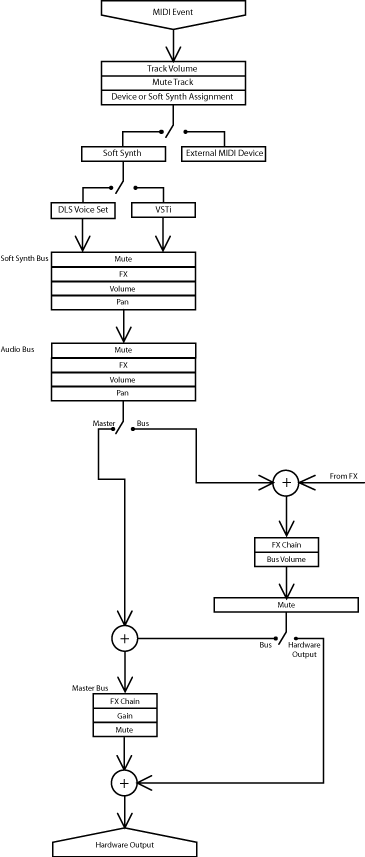
Soft synth panning is available
only in 5.1 surround sound projects. In 5.1 surround sound projects, soft
synth bus controls routed to the Surround Master bus send surround panning
(six-channel) information. Soft synth bus controls routed to busses (e.g.,
Bus A) send stereo panning (two-channel) information.
Bus panning is available only in
5.1 surround sound projects. In 5.1 surround sound projects, busses routed
to the Surround Master bus send surround panning (six-channel) information.
Busses routed to hardware send stereo panning (two-channel) information.