Triggering from MIDI Timecode

From the Options menu, choose Timecode, and then choose Trigger from MIDI Timecode from the submenu if you want playback to be initiated by receiving timecode from another device.

Trigger playback from MIDI timecodeClosed

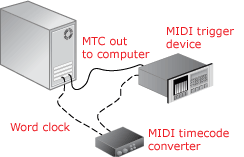
  1. Connect a word clock signal between your computer and triggering device to lock synchronization.

    If the MIDI trigger device can output MIDI timecode, a timecode converter is not necessary; you can connect the trigger device directly to your computer.

  2. Configure your trigger device to send MIDI timecode (MTC) to your computer.

  3. Configure Acid software to receive MTC:

    1. From the Options menu, choose Preferences and select the Sync tab.

    2. From the Input device drop-down list, choose the port from which you will receive MTC.

    3. From the Frame rate drop-down list, choose the frame rate that your trigger device will use to send MTC to Acid software.

    4. Click OK to close the Preferences dialog.

  4. From the Options menu, choose Timecode, and choose Trigger from MIDI Timecode from the submenu.

    When an incoming MTC signal is received, the Acid project will begin playing from the position indicated by the timecode. If Acid software is not receiving MTC, you can play and edit normally.

View incoming timecode Closed

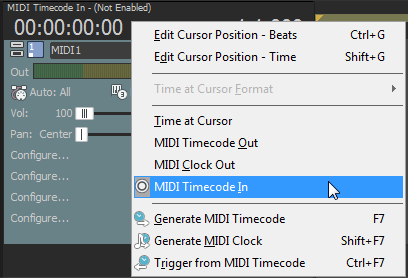
To view the incoming timecode, right-click the Time Display and choose MIDI Timecode In from the shortcut menu. The Time Display will now show the incoming MTC time.

This display will also show status and error information. If Trigger from MIDI Timecode is enabled but no MTC is detected, the display will show Waiting... If the wrong frame rate of MTC is being detected the display will show Wrong format.