Using MIDI plugins
There is a special category of VST instruments that don't produce it's own sound but instead generate MIDI output, either of its own, like Step sequencers or derived from its own MIDI input like arpeggiators, chord assistants or even complete composing tools. To use these plug-ins in Acid Proproceed as follows:
-
Insert a MIDI track, click on the MIDI Output button and chose Insert Soft Synth to load your MIDI plug-in.
-
Insert a MIDI track that should receive the MIDI output from the MIDI plug-in and insert a soft synth there.
-
In this track, click on the MIDI Input button and chose the MIDI plugin as track MIDI input
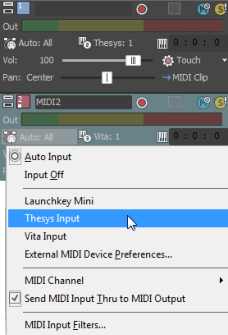
-
The soft synth of the second track now receives the MIDI from the first one
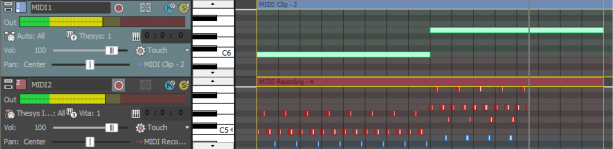
In this example, the step sequencer on track 1 transforms the long single notes into arpeggios that then were recorded on track 2.
Last modified on April 27, 2026
Was this page helpful?
What did you particularly like about this page?
What did you dislike about this page?
Thank you for your feedback.