Using an External Video Monitor

You can send video directly from the timeline to a television monitor. With this feature, you can make your final editing decisions on a broadcast monitor, which differs significantly from a computer monitor. To use an external monitor, you must have the following:

  • OHCI-compliant IEEE-1394 DV card

  • DV camcorder or DV-to-analog converter

Set up an external monitor Closed

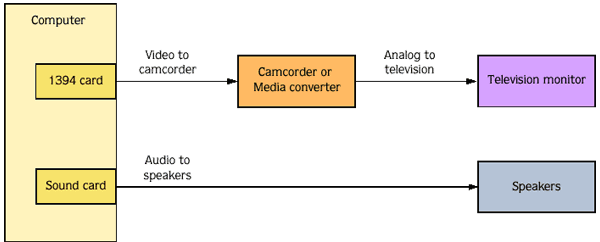
The diagram below shows the preferred setup for sending video from the Acid timeline to an external television monitor.

The video is converted to DV format and sent through the IEEE-1394 card to the DV device (camcorder or DV-to-analog media converter). The DV device sends analog output to the television monitor.

Use the Video tab in the Preferences dialog to configure your IEEE-1394 card.

NOTE The DV device must support pass through in order to use an external monitor.

Preview audio Closed

When you preview on an external monitor, no audio is sent through the IEEE-1394 card.

As shown in the illustration in the previous heading, audio is sent to the sound card and then on to the mixer (if present) and speakers so you can mix your audio on better speakers than are typically found in television monitors.