Working in Wave Projects
The audio file will be opened in a separate window (wave project). In the title bar of the wave project window, you will see the name of the file, the bit resolution, the length of the sample and the resulting required memory. Navigation and playback controls with zoom, scroll, range and marker functions are the same as for virtual projects.
Wave projects are played back using the standard audio output device. You can set it at Program Preferences > System Options > Playback. (Keyboard shortcut: P)
Mouse modes: All mouse modes are available that are useful in the context of editing wave projects: The range mode  replaces the preset universal mode and is used for range selection. The Draw volume and the Draw automation modes
 can be used to draw a volume curve in the real-time wave editing mode. In Destructive wave editing mode, the volume drawing mode lets you edit the volume directly. Scrubbing mode
  , Zoom mode
  and Spectral mode
  work as in virtual projects. The Draw wave mode
  (see below) is only available in wave projects.
Editing: The same range-related editing functions as in the VIP can be executed via the Edit menu and the corresponding keyboard shortcuts.
Effects: The effects of the Effects menu are applied "offline". Please refer to the notes at Destructive effect calculation.
Creating a new wave project by drag & drop: To create a new wave project as a copy of a part or the whole audio file, select a part or the whole audio data (keyboard shortcut: Ctrl + A) and drag it from the project window to a free area of the program background.
Import an open wave project into a virtual project: A wave project or a range from a wave project can be imported into a simultaneously opened virtual project. Activate the desired wave project window, select a range in it if necessary and activate the VIP immediately afterwards. Menu Object > More > New Object inserts the wave project or the range selected in it as a new object in the VIP in the selected track at the play cursor position.
Waveform Drawing
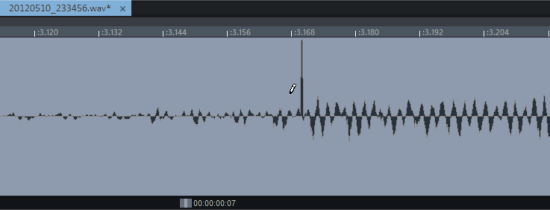
In wave projects, you can use the mouse mode Draw wave to draw in the waveform of a file. The waveform display shows a suitable zoom level, and the mouse pointer becomes a pencil. Changing the waveform in the wave project window is suitable for manually correcting individual very short glitches or drop-outs.