BitMachine
There are some situations where a more imperfect, lo-fi sound would suit a drum loop or synthesizer sound perfectly. Remember that the first hardware samplers from the '80s that usually only ran at 8 or 12-bit rates and at low sample rates.
With the BitMachine, changing the sound with such an "antique" device is no problem. You can use the BitMachine to bring back to life the times when minimalist and scratchy sound chips in home computers were commonplace.
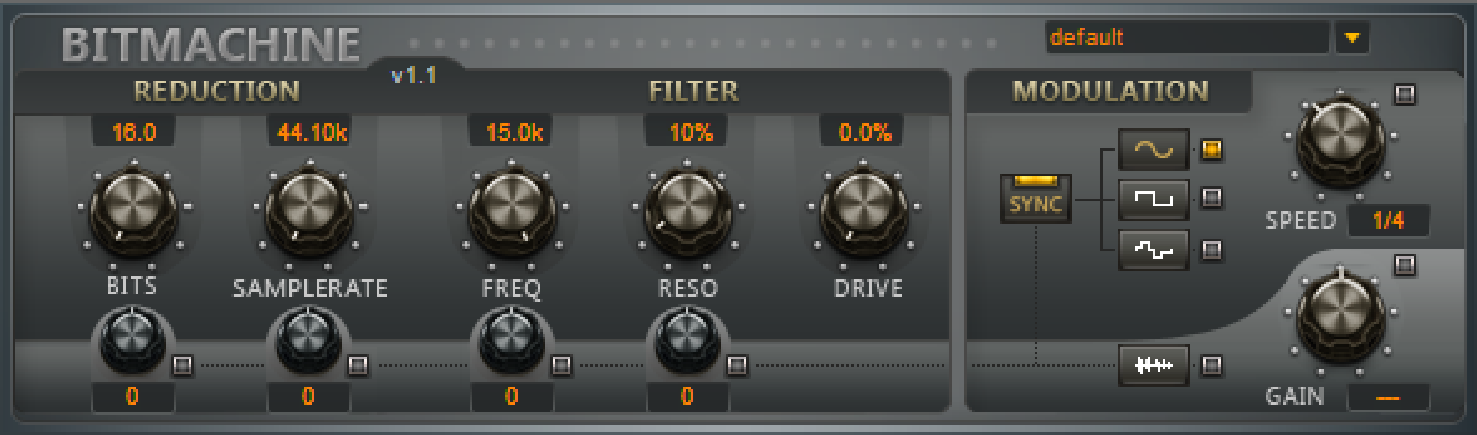
The BitMachine opens up a gateway to "acoustic time travel" where you can encounter bit and sample rate reduction and downstream filters based on analog models. The effect also has a modulation section with which you can control individual parameters using an oscillator (LFO) or the input signal.
We have designed a range of "typical" presets to demonstrate the time travel abilities of the BitMachine. These can be opened at the top right of the interface.
Section REDUCTION:
-
BITS: This slider controls the resolution of the audio material. Turning the dial to the left results in 16-bit quantization, and thereby CD quality. The further it is turned to the right, the lesser the signal dynamic becomes. In extreme cases (1-bit), there are only "on" or "off" states.
In the intermediate levels, you'll notice an increase in the background noise and a decrease in the dynamics. For example, 8-bit quantization will exhibit dynamics of only 48 dB. Quieter points in the material sound noisy and very quiet points sound "capped". This effect is amplified the more you turn the dial to the left, until it starts crackling or "groaning".
-
SAMPLERATE: Das・Audiomaterial・wird・mit・diesem・Regler・"calculated down",・i.e.・the・internal・sampling rate・is・reduced. This creates a division ratio between the old and new rates; according to this ratio, samples are "dropped" at various points in the data stream.
Note: The two smaller controllers in this section are explained at MODULATION.
Section FILTER:
The filter in the BitMachine is a digital model of one of the most well-known filters in music electronics. The filter in question is the 'Chamberlin 2-pole' filter, which was used in old Oberheim synthesizers. Filters of this type sound extremely musical. They can also be used in quite creative ways in the BitMachine and don't necessarily have to be used only to smoothen out artifacts.
The filter works in low pass mode – according to the settings, it lets through low frequency (or medium) material and dampens the highs and medium ranges.
-
FREQ: With this control you determine the "cutoff frequency" of the filter. Filtering starts above this frequency.
-
RESO: This allows the signal to be strongly boosted ("resonance") in a range around the cutoff frequency. This makes sharp, cutting sounds possible. The effect becomes even clearer when you vary the cut-off frequency.
-
DRIVE: Both of the individual filters of the connections mentioned above have the ability to overmodulate themselves internally. With the DRIVE dial, you can regulate the amount of overmodulation. What happens is that the parameters of the internal workings of the filter interact with one another. So increasing DRIVE weakens the resonance, but at the same time, the signal receives more volume, more bass and becomes acoustically fuller.
Note: The two smaller controllers in this section are explained at MODULATION.
Section MODULATION:
By using the settings in the MODULATION section, you can automate your effects.
A low-frequency oscillator (LFO for short), whose tempo and waveform can be controlled, can be used to modulate the parameters in the sections REDUCTION and FILTER. The strength of the modulation is determined by the four small knobs under their parameters.
Note that the parameters must not be set to their maximum value, because then the modulation has no influence. The modulation is always added to the set value.
-
As waveforms for the LFO sine, square or random values are possible.
-
The LFO speed is specified with the SPEED dial. If SYNC is active, the LFO follows the song tempo and uses musical values (e.g. ¼ notes). Without SYNC you can set the tempo manually (in Hz).
-
Envelope-Follower: With the lowest button at the LFO waveforms the volume of the signal is used for modulation, you can adjust the sensitivity with the GAIN knob.
The SPEED knob is used to control the speed of the envelope follower (the display therefore changes to milliseconds). Short times result in a fast response to the input signal, longer times make the envelope rise and fall more slowly.