Search Title Information Online
For audio files copied from published CDs using third-party software, the metadata (track names, etc.) can be determined using the online CD title database gnudb. This query is based on the exact combination of the exact track lengths and order of the tracks on a CD. This also works if the tracks are loaded into the project individually (e.g. as MP3 files) and are in the right order. The track lengths can also deviate by a few seconds from the exact track length, but in general the correct CD is still recognized.
The gnudb title query is available via:
-
the button gnudb title info in the dialog Prepare Audio CD,
-
Menu CD > Get gnudb title info.... In this case, the search is performed using the CD track indices available in the project.
gnudb Options
In case the query does not work, various settings can be made in the menu CD > gnudb options:
-
gnudb user data: This sets the user data that Music Studio will use when requesting the gnudb. The use of the gnudb is anonymous and the user data is actually arbitrary, but the gnudb may need to handle many requests at once and therefore must be able to identify users. If you have problems accessing because someone happens to access gnudb at the same time using the same preset data, you can change it here.
-
gnudb proxy options: If you have problems connecting to the gnudb server, you can choose another server from the list here if necessary or, as a first workaround, set the timeout value higher. An increased work load causes the server to react slowly and a connection cannot be made properly.
-
clear gnudb cache: The gnudb online database creates a cache on the local hard disk. The cache contains all files that have already been imported via gnudb online. If necessary, this data can be accessed again at any time without always having to be online. However, you may wish to delete this cache at some point, for example, if it contains erroneous files or if new files are made available online.
Search CD Title Online
The gnudb title search can also be used if the exact title lengths are not known, because, for example, after a recording from cassette or record, there is only one large file in which all titles are available one after the other without title indices. Although you can use the function Menu CD > Indices > Indices after silence… to determine the track lengths based on the pauses, this does not work very well when the tracks segue into each other.
But if you know the album the tracks are from, you can also find out the track names and exact lengths by querying the gnudb CD database online. To do this, proceed as follows:
-
Place the recording in the first track.
-
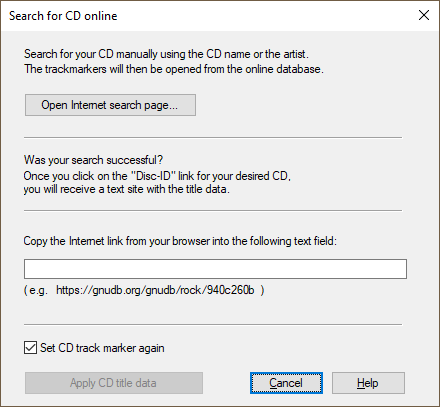
From the menu CD > Search CD online and set track indices…. The Search CD online dialog opens.
-
Start up your Internet browser and go to the gnudb search page by pressing the Open Internet search page button.
-
Enter the name of the album or band into the search field. One or more albums matching the search query will be listed. If you know that a certain album fits your recording, then click on Details. It will display the CD track list you were looking for alongside other details.
-
Click the link at Disc ID (an 8-digit number/letter combination, e.g. bf102c0e). The gnudb record for this CD is displayed.
-
Copy the URL (Internet link) from the address bar of your browser onto the clipboard.
-
Go back to Music Studio and paste the Internet link into the text box at the bottom of the dialog. Then click on Apply CD title data. The CD title indices with the corresponding names are set in the project.
Attention: It may happen that the length of the first track does not match the track length provided by the database if the first track starts very quietly (e.g. intro or applause in live recordings) and thus the start of the recording was too late. As a result, all track markers will be a little bit too far back. In this case, move the second track marker forward while holding down the Ctrl-key; all subsequent track markers will then be moved by the same amount and should be positioned appropriately at the start of each track.