Polyphonic Notation
Up to two independent voices can be annotated for each note line. The voices differ in the direction of the note stems: the first voice is always notated with the stem pointing upwards, the second with the stem pointing downwards. Pauses are displayed individually for each voice.
|
|
|
|
Monophonic representation |
Polyphonic representation |
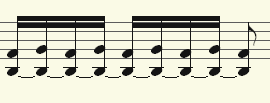
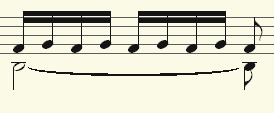
You can set the voice by selecting the notes and clicking the corresponding buttons:
|
|
Assign 1st voice (stem direction up) |
|
|
Assign 2nd voice (stem direction down) |
|
|
By selecting Automatic voice assignment, the defined voice assignment can be canceled. |


Tip: You can also find the corresponding commands in the MIDI Editor menu Score and assign keyboard shortcuts to them.
In the case of automatic voice assignment, the MIDI channel of the notes is evaluated for voice assignment: To do this, specify a MIDI channel for the second voice in the Score properties dialog. You can set this individually for each stave. All notes on this staff coming from MIDI channels other than the set one will be assigned to the 1st voice. If no MIDI channel is specified for voice assignment and no manual voice assignment has been made, all notes are drawn as 1st voice.