Vita
The Boris FX Vita synthesizer specializes in the realistic reproduction of instruments. It works using sampling technology which combines short recordings (samples) of real instruments of various pitch, playing techniques and volume, which are then combined and reproduced.
The Vita Interface
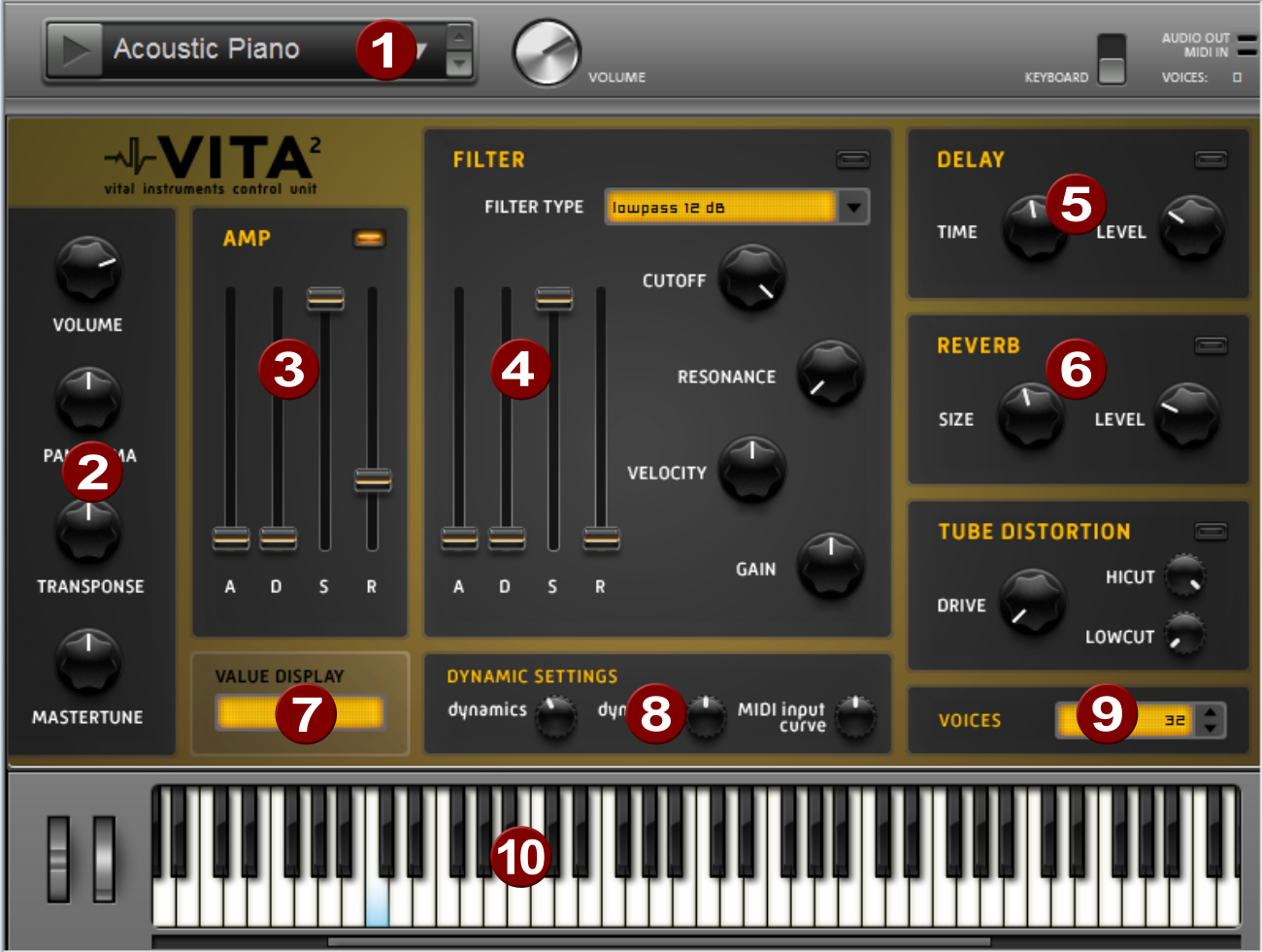
|
|
Layer selection/Peak meter: The Vita sounds, also called layers, can be selected here using the arrows. Right-clicking on this display opens the layer menu. |
|
|
Main parameter: Set the volume, panorama position, pitch offset ("Transpose"), and the fundamental frequency ("Master tune") here. |
|
|
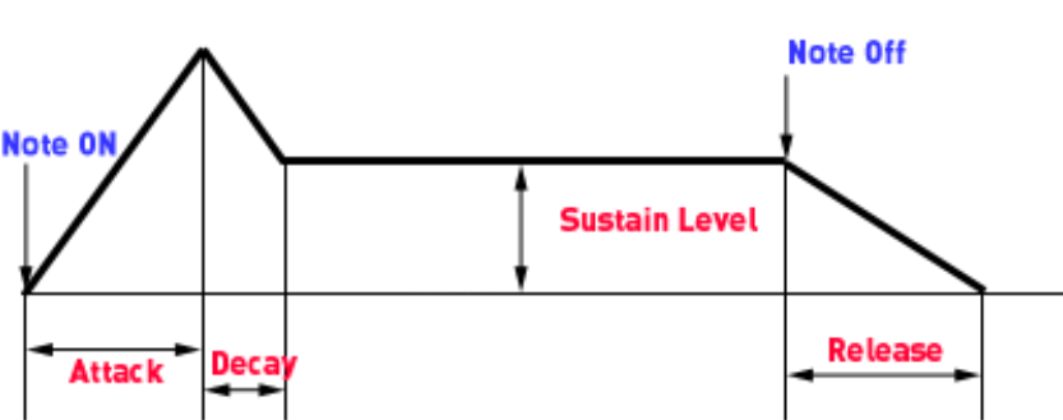
AMP: This is the volume envelope. This allows you to influence the time course of the volume of a sound. A(ttack) stands for the volume increase at the start, D(ecay) for the duration of the volume drop to a proportion of the maximum volume specified by S(ustain). R(elease) is the length of time it takes for the sound to fade out after the note stops.
|
|
|
FILTER: Here you can switch on a filter which influences the sound. With FILTER TYPE you can select the kind of filter you want to use. Cutoff controls the filter frequency, Resonance the amount of emphasis on the filter frequency. Velocity indicates how much the velocity influences the filter frequency, using Gain you can balance the volume. The filter envelope (ADSR slider) influences the filter frequency depending on the time. |
|
|
DELAY: Here you can switch on an echo effect. Time controls the delay time and Level controls the strength of the echo sound. |
|
|
REVERB: Here you can switch on a reverb effect. Time controls the delay time and Level controls the amount of reverb. |
|
|
VALUE DISPLAY: This always displays the exact values of the parameter that was just adjusted. |
|
|
DYNAMIC SETTINGS: Usually, the relationship between the created volume and MIDI velocity is proportional. Since some MIDI keyboards need too hard a stroke for loud notes or, conversely, deliver too high a velocity for a light stroke, you can compensate for this behavior with the MIDI Input Curve. Using dynamic and dynamic curve you can manipulate the dynamics of a sound, i.e. the relationship between the loudest and quietest sounds. |
|
|
VOICES: Here you can control the number of voices played simultaneously. If notes stop playing during fast passages, you can increase the number of voices here at the expense of performance. |
|
|
Keyboard: This allows you to try out the sounds of the Vita. |




Vita - MIDI Specifications
|
Vita parameter |
Control Change # |
GeneralMIDI |
|
ModWheel |
1 |
ModWheel |
|
Volume |
7 |
Volume |
|
Pan |
10 |
Pan |
|
Mastertune |
14 |
Mastertune |
|
Sustaining |
64 |
Sustaining |
|
Cutoff |
71 |
Filter Cutoff |
|
Amp Release |
72 |
Release Time |
|
Amp Attack |
73 |
Attack Time |
|
Resonance |
74 |
Resonance |
|
Amp Decay |
75 |
Decay Time |
|
Amp Sustain |
80 |
Button 1 |
|
Filter Velocity |
81 |
Button 2 |
|
Filter Gain |
82 |
Button 3 |
|
Reverb Level |
91 |
Reverb |
|
Reverb Size |
92 |
Tremolo |
|
Delay Level |
93 |
Chorus |
|
Delay time |
94 |
Delay/Vari |
|
Filter Attack |
102 |
- |
|
Filter Decay |
103 |
- |
|
Filter Sustain |
104 |
- |
|
dynamics |
108 |
- |
|
dynamics curve |
109 |
- |
|
MIDI input curve |
110 |
- |
Vita - MIDI Event Types
|
Pitchbend |
x |
|
NoteOn |
x |
|
NoteOff |
x |
|
ControlChange |
x |
|
Aftertouch |
0 |