Vocoder
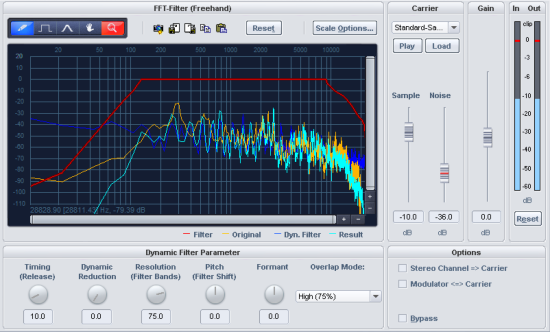
The vocoder works as follows: Carrier material (e.g. a string instrument pad or synth chord) is affected by a modulator (e.g. language or singing) to give the impression that the pad sound is “speaking” or “singing”. Additionally, rhythmic pads can be created by modulating an area with a drum loop.
This works by transmitting the modulator's frequency characteristics (language) to the carrier (chord).
A vocoder thus always has two inputs and one output. Since Music Studio effects usually have only one input, the carrier signal is obtained within the effect, continuously mixable from white noise and any wave file.
The Vocoder also offers a real-time FFT filter for editing of the Vocoder signal.
Filter Curves
The yellow line corresponds to the frequency response of the modulator, the light blue line represents the carrier signal. The red line is a freely drawable
Reset: This button resets the red filter curve to its initial state.
Dynamic Filter
Timing (Release): Affects the speed of the dynamic filter adjustment to the modulator spectrum. As the release value increases, the Vocoder follows the modulator slower and slower, and the sound changes sound softer and feature more reverb in the carrier. To improve the clarity of spoken words, this parameter should be set to a low value.
Dynamic (Reduction): This parameter affects the dynamics of the modulator signal for reducing the modulation depth of the dynamic filter.
This prevents two often undesired side effects of modulation. On the one hand the volume change of the modulator signal is added to the output signal in a slightly more moderate form, which may improve the power of the vocoder voice. On the other hand, the low-level portions of the modulator signal are ignored in order to prevent modulation of the carrier by breathing or noise.
As an alternative to using dynamic reduction directly in the vocoder, it is possible to adjust the signal dynamics of the modulator signal or the resulting signal using the dynamic tools integrated in Music Studio.
Resolution (filter bands): Dynamic filter resolution (approximately dependant upon the number of filter bands). The best results are achieved with medium to high resolution.
Pitch (Filter shift): The dynamic filter of the Vocoder shifts the frequency up or down to create certain pitch effects. For the clearest speech results, it is recommended not to change this parameter.
Formant: Stretches the dynamic filter curves to manipulate the formants. This changes the characteristics of the Vocoder voice.
Overlapping: This internal parameter changes the overlapping of the time window for the modulator signal spectrum calculation. On the "low" setting, the Vocoder sounds softer and more melodic, but some of the clarity of speech may be lost.
Carrier signal
Sample selection list: The desired carrier signal can be selected here. All open audio files appear in the selection list, as well as special carrier samples loaded from the "Vocoder" folder. Preferred carrier samples consist of material with even frequencies e.g. orchestral chords, broad synthesizer sweeps, sound of the wind, etc.
Sample (dB): This fader adjusts the proportion of the carrier sample.
Noise (dB): This slider allows white noise to be mixed into the carrier. This is above all useful if the carrier material can't be modulated well or sounds too uneven. Whispering voices can also be produced in this fashion.
Volume (dB): Adjusts the vocoder output level.
Options
Modulator <=> Carrier: Swaps modulator and carrier signals. This is particularly useful if the "stereo channel as carrier" option is used.
Stereo channel as carrier: If this option is active, the sample from the selection list is no longer used as the carrier signal, but a channel of the input signal. The other channel will continue acting as a modulator.
Bypass: This allows you to temporarily disable the effect in order to compare the unprocessed signal with the processed signal.