Crossfade Editor Object Mode
Because subsequent objects are moved when you work on cuts and crossfades in Classical mode, to protect subsequent edits you probably want to use the Object mode Link one track while you are working in the Crossfade Editor. By default, this mode is automatically loaded when the Crossfade Editor is opened. In the project itself, however, you may prefer to work in Normal Object Mode. Therefore, the Crossfade Editor has a separate setting for the object mode, which becomes active as soon as you open the Crossfade Editor.
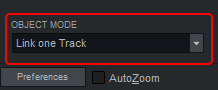
When you exit the Crossfade Editor, the mode that was set in the project is restored.
If you want to use the same object mode as in the Arranger, select Use Global Mode in the Crossfade Editor preferences for Preset Object Mode.