DDP Export
The DDP Export add-on program allows you to export a CD project that is compatible with the DDP CD mastering standard. It is opened using
Set the name for the audio file to which the audio data for the CD will be written. Sequoia exports the project and then displays
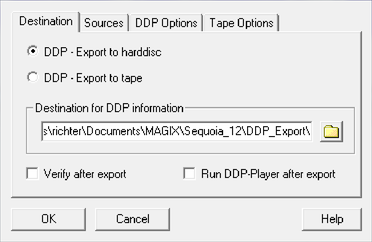
The project can be exported either to hard disk or onto tape (for example, Exabytes EXB-8505, EXB-8500). You can then deliver a project exported to disk to a pressing plant via file transfer.
Destination for DDP information: When exporting to hard disc, a destination folder can be specified here. If exporting to tape, enter the path of the tape drive here. With the function Verify after export you start an import of the image for verification after the export.
The Run DDP player after export option opens the "Boris FX Sequoia DDP Player by Sonoris" directly after export.
Sources: The CD-Info file (*.tcd) belonging to the project is created automatically by Sequoia. If the DDP export was not started from Sequoia, but directly from the Sequoia program folder, you can select the corresponding files (CD Info *.tcd + audio file/data file) here. CD info details shows the content of the CD info file.
DDP options: The formats of the 1.01 and 2.00 standard for DDP export can be used and also specify a Master ID. This ID is used by the manufacturer for testing purposes.
Tape options: Enter a Volume ID and an Owner ID for archiving.
With OK the CD project is exported, creating the following files: DDPID (DDP-Id-Stream), DDPMS (DDP-Map-Stream), Image.DAT (audio data), CDTEXT.BIN (CD text information), PQDESC (PQ description), CHECKSUM.TXT (CRC32) and CHECKSUM.MD5. For electronic transmission to the pressing plant, it is best to pack all files together in an archive (zip, rar...).
Note: Sequoia also creates a WAV file during DDP export. This does not need to be transferred to the manufacturer, since the audio data is already included in the Image DAT file.