MIDI Machine Control (MMC)
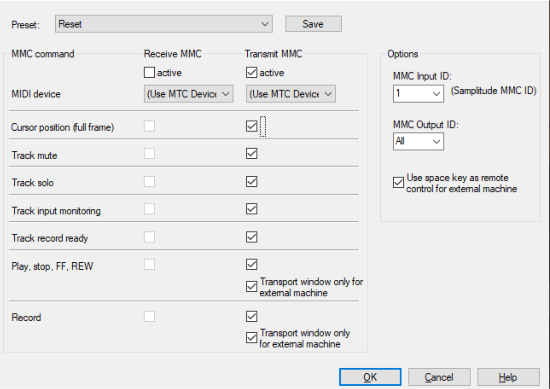
Sequoia supports the synchronization of external devices via MMC. In the project options (menu Project properties > MMC Settings...) you can configure MMC remote control.
Choose between the working modes Receive MMC and Send MMC:
-
Receive MMC (slave): If Sequoia shall work as slave, activate this option. Sequoia follows JOG shuttle operations, play marker position, track mute, track solo, track input monitoring, track record ready, play, stop, fast forward, rewind, and record commands from external devices.
-
Send MMC (master): Sequoia works as master. Whenever you execute commands such as Play Marker Position, Track Mute, Track Solo, Track Input Monitoring, Track Record Ready, Play, Stop, Fast Forward, Rewind, and Record, the external device follows. If you additionally set "Receive MMC", Sequoia receives the current playback position of the device and displays it as an additional blue play cursor in the timeline.
When playing a range in Sequoia, the MMC device stops when the end of the range is reached.
-
Transport console only controls external device: If this option is active, the transport console no longer controls the playback and recording of Sequoia, but controls the external MMC device. Play, Stop, Fast Forward, Fast Backward and Rewind no longer have any direct effect on Sequoia playback. The Record button starts the recording in Sequoia synchronously to the playback of the MMC device.
-
Use space bar for remote control of external devices: If this option is active, start and stop via space bar control the MMC device.
-
Input MIDI device: Select here the MIDI device from which MMC is received.
-
Output MIDI device: Select here the MIDI device to which MMC is sent.
-
MMC Input-ID: Enter here the Input MMC ID from Sequoia.
-
MMC output ID: Set the input ID of the MMC device you want to control remotely.
List of implemented MMC commands
|
Command |
Receive |
Send |
|
Full frame |
yes |
yes |
|
Stop |
01 |
01 |
|
Play |
02 |
02 |
|
Deferred Play |
03 |
- |
|
FFWD |
04 |
- |
|
Rewind |
05 |
- |
|
Record ON |
06 |
06 |
|
Record OFF |
07 |
07 |
|
Record Pause |
08 |
- |
|
Pause |
09 |
- |
|
Locate |
44 |
44 |
|
Variable Play |
45 |
45 |
|
Shuttle |
47 |
- |
|
READ location |
42 01 |
- |
|
READ motion control tally |
42 48 |
- |
|
READ record status |
42 4d |
- |
|
READ track record status |
42 4e |
- |
|
Track Record Ready |
42 4f |
40 4f |
|
Track Input Monitoring |
42 53 |
40 53 |
|
Track Mute |
42 62 |
40 62 |
|
Track Solo |
42 77 |
40 77 |
Boris FX MMC extension
F0 7F <device_id> 06 6F <…> F7
|
Set Marker |
6F 01 |
New auto numbered marker |
|
Navigate playback marker to marker left/right |
6F 02 n |
n = 00 to left marker n = 01 to right marker |
|
Set all tracks RecRdy on/off |
6F 03 n |
n = 00 off n = 01 on |
|
Set Monitoring Mode |
6F 04 n |
n = 00 manual monitoring n = 01 tape monitoring |
|
Set Input Monitoring on/off |
6F 05 n |
n = 00 off n = 01 on |
|
Set Sync Mode on/off |
6F 06 n |
n = 00 off n = 01 on |
|
Set Loop Mode on/off |
6F 07 n |
n = 00 off n = 01 on |
|
Set Punch Mode on/off |
6F 08 n |
n = 00 off n = 01 on |
|
Delete Punch Marker |
6F 09 |