sMax11
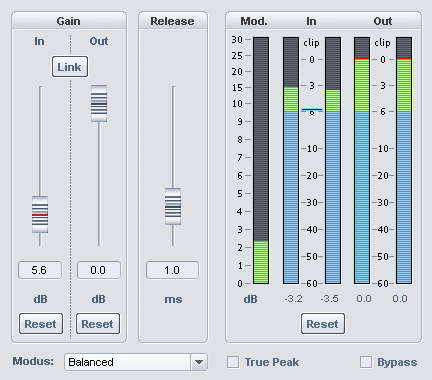
The Maximizer sMax11 is a hard (brickwall) limiter with input gain that allows you to increase the loudness of your audio signal. Specify an input gain (Gain In), the signal will be amplified by this level. At the same time, the sMax11 ensures that the signal does not exceed the output level (Gain Out). With the parameters Mode and Release time you can, depending on the audio material, influence the necessary control processes.
Gain In: This value specifies how much the signal should be increased (maximal). Reset (Gain In): Resets the "Gain-in" parameter.
Gain Out: Maximum output level. Reset (Gain Out): Resets the "Gain-out" parameter.
Link: Gain In and Out are coupled, i.e. the Gain Out is reduced by the same value as the Gain In value is increased. For example, with the Link option turned on, you can increase the gain-in without increasing the output volume. This makes it easier to recognize distortions that appear as a result of a gain-in value set too high.
Release: Time span until the effect processing of the signal is completely withdrawn in milliseconds.
Mode: Control behavior of the effect. Select the mode most appropriate for your application:
- Balanced: Lowest level of distortion with transparent sound, robust to use. Appropriate for example for speech recordings.
- Fast: Addresses slightly faster than "Balanced". The mode corresponds to the behavior of the hard limiter in the Advanced Dynamics compressor.
- Aggressive: Very short attack time, suitable for especially sharp transients for this reason. For signals with dominant percussive components, the hardness of the beats is preserved. Distortions are masked by the beat.
- Hard clipper: In this mode the regulation is switched off. Level peaks are simply cut off, which can lead to strong distortions. This mode is appropriate for example to accentuate the transients of individual beats even stronger.
Displays:
-
Mod.: Modification of the signal in dB. This does not take the input gain component into account. Only the level of processing necessary to intercept the level peaks is shown.
-
In/Out: The peak meters show the input and output level in dB.
Reset resets the peak meters.
True Peak : As the level above which the signal is considered overdriven (clip), you can also select the maximum peak level (Maximum True Peak Level), which you set in the loudness adjustment. When limiting the signal, inter-sample peaks are then also taken into account to prevent distortion during D/A conversion at the analog output.
Instructions:
- First, turn on the Link option. This way, volume will stay constant and you can better compare your changes.
- Now, raise the input amplification Gain In until the sound changes become unacceptable.
- Now turn down the Gain In a little bit.
- You can also minimize distortions by raising the Release time. However, this will reduce the compression effect and the increase in loudness.
- Switch Bypass on once in a while.
- When you have found the optimal setting, turn off the Link option and set the Out Gain to 0 dB.