ASIO Settings
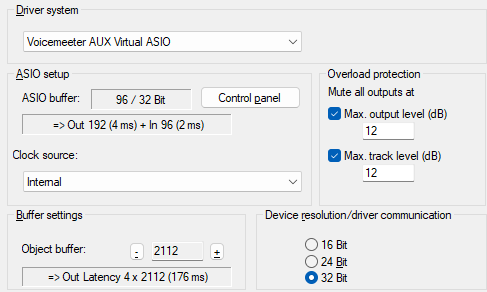
Driver System: Select the driver to use from the list of ASIO devices installed on the system.
ASIO setup: Use the Control Panel button to open the driver's settings dialog. Next to ASIO Buffer in the display field you can see the buffer size and bit resolution set in the driver. The output and input latencies are also displayed. The entries in the menu Clock Source are provided by the sound card driver. There some sound cards offer the possibility to synchronize the sound card to an external clock.
Overload protection: If the level of a track or the master exceeds the values set under Max. track level or Max. output level, the output is automatically muted to prevent damage to amplifiers, speakers, or the user's hearing. Playback or a running recording is not interrupted at first; only a warning dialog is displayed.
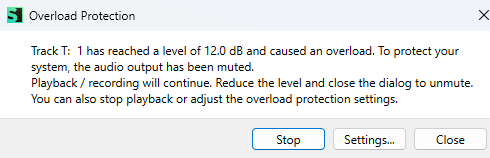
Sequoia can still be operated, allowing you to reduce the levels in the mixer or on the object and close the dialog, which will unmute the track. Click Stop to close the dialog box and stop playback. Settings… opens this settings dialog, where you can
Device Resolution/Driver Communication: Here you can select the bit resolution for addressing audio devices. The preset value correlates with that of the sound card installed on your system.
The ASIO driver system specifies the bit resolution of the ASIO drivers. Sequoia always adopts the bit resolution set in the ASIO driver. The setting determines whether the data received from the sound card is converted to a different bit resolution
Buffer settings: At VIP object buffer the buffer size for the Economy Engine is set. In the preset Monitoring/Engine mode Mixer FX Monitoring/Hybrid Engine it is used only for playback of objects
The VIP object buffer size should be larger than the ASIO buffer size and between 1024 samples and 8096 samples.