FX I/O Matrix
The FX I/O Matrix allows you to distribute the channels of the signal that is sent to a plug-in slot to the input channels of the VST plug-in. The output channels of the VST plug-in can in turn be assigned to the output channels of the plug-in slot. This is helpful, for example, to correct incorrect channel assignments for surround effects in surround buses.
You can open the FX I/O Matrix by selecting FX I/O Matrix in the Plug-in menu of the VST plug-in window (keyboard shortcut: Ctrl+F6).
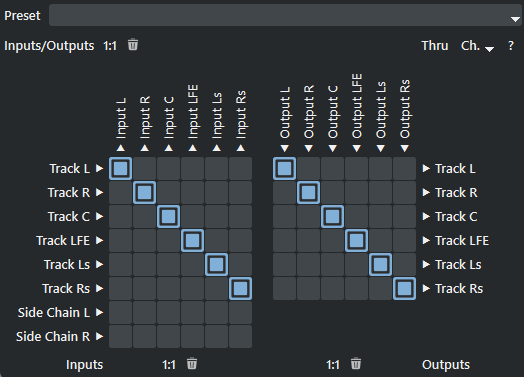
The left-hand matrix allows you to route the track signal (rows) and the sidechain inputs to the plug-in inputs (columns). Use the right-hand matrix to route the plug-in outputs (columns) back to the track channels (rows). The sidechain input channels are only displayed if sidechaining is available and activated in the plug-in, i.e. a track signal is routed to the sidechain input.
There are two buttons for each matrix: Restore default routing  and Remove all routings
  . The buttons above apply to both matrices.
Thru: The Thru button sends the signal of all track channels that are not routed to plug-in inputs back into the effects chain unchanged. This allows you to use several stereo plug-ins loaded into different plug-in slots of a surround bus or master.
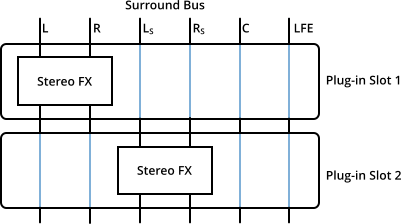
In this example, two stereo effects are used in parallel in a 5.1 bus.
Ch.: In the menu Channels, the number of channels of a plug-in to be used in the matrix can be limited to mono or stereo. In conjunction with the Thru Option, it is possible to use surround-capable plug-ins as stereo plug-ins that are automatically used in a surround bus with the total number of channels of the bus otherwise, and thus use different plug-ins or the same plug-in with different settings on that bus.
In the Preset menu on top you can save presets for the matrix. As these presets rely on a certain channel configuration (eg. Surround preset) they are saved in sub-folders named after the Surround setup preset used for creating the bus or master. The FX I/O matrix presets that are from this folder are shown in the preset menu and can be loaded by selecting it.
For FX I/O matrix presets to work, if you create custom channel configurations in the Surround setup dialog, make sure you save this configuration under it's own name when you plan to use FX I/O matrix presets in effects on those busses.
You can save a default preset. If there's a default preset for plug-in in a certain channel configuration, then automatically the FX I/O matrix is activated and the preset loaded when inserting the plug-in into that kind of bus.
With the internal effects of Sequoia, any groups of channels can be assigned to different instances of the effect, which can be set together or individually. For more information, see Surround effects