VST/ReWire
-
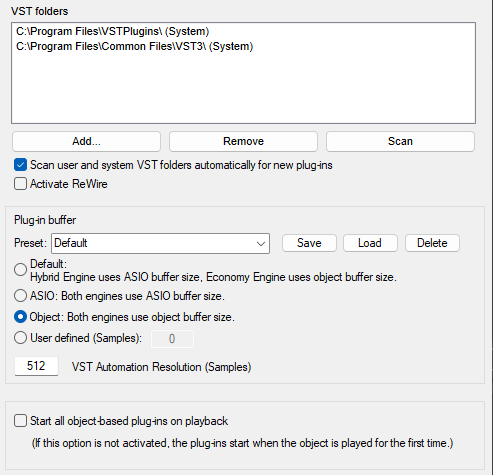
VST folders: List of search paths for VST plug-in effects and VST instruments. With Add… and Remove you can add and remove search paths.
-
Scan: Sequoia performs a VST scan for a selected folder. All plug-ins are checked for their compatibility in Sequoia.
More information regarding this dialog and general information on installing VST plug-ins can be found under Installation of VST Plug-Ins.
-
Scan user and system VST folders automatically for new plug-ins: With this option you can set the program to scan automatically at every program start, but especially if you have a lot of plug-ins installed, this will increase the startup time.
-
Activate ReWire: If this option is activated, rewire-compatible client applications can be integrated into Sequoia as synthesizers.
Additional information about ReWire can be found in the ReWire chapter.
-
Plug-in buffer: Setting for the buffer size used for VST plug-ins.
-
Default: The Hybrid Engine uses the ASIO buffer size, the Economy Engine uses the object buffer size. This is the recommended setting; the buffer size adapts to the engine used.
-
ASIO: Both engines use ASIO buffer size. Both engines use ASIO buffer size. This setting is only useful for running DSP hardware that cannot handle different buffer sizes when used simultaneously in different engines (e.g., as a track and object effect). For all other applications, it is generally not recommended, as it leads to very inefficient plug-in processing.
-
Object: Both engines use object buffer size. Like ASIO, this setting is not recommended for general use, but can also be used with hardware-based plug-ins that require uniform buffer sizes. It delivers better performance than the ASIO setting, but causes latency and can cause problems with normal plug-ins due to the large buffer size.
-
User defined: Manual setting. In cases where a uniform buffer size is required, you can experiment with your own values here.
-
VST Automation Resolution: In the Hybrid Engine, the ASIO buffer size is used. To achieve a better resolution of the automation also in the "Economy Engine", which works with VIP buffers, you can enter a correspondingly lower value here.
The default presets usually cover most applications when working with plug-ins. Try out various presets if you are experiencing problems with plug-ins or DSP cards.
-
-
Start all object-based plug-ins on playback: The advantage of object effects is that effects generate computational load only while the object in question is playing. However, some plug-ins cause delays at startup. This option therefore allows you to specify that the plug-ins on objects are always started when project playback is started, regardless of whether the object in question is being played.