Marking Out
From the Edit menu, choose Selection, and then choose Mark Out to set the end of the loop region at the current cursor position.
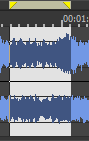
You can then right-click bar at the top of the loop region to insert a region, toggle looped playback, or select the loop region.
TIP Select the Update loop bar on Mark In/Out check box on the Editing tab of the Preferences dialog if you want the loop bar in a data window to be updated when you mark the beginning or end of a selection. When the check box is cleared, the loop bar isn't updated until after you've marked both ends of the selection.
Last modified on February 09, 2026
Was this page helpful?
What did you particularly like about this page?
What did you dislike about this page?
Thank you for your feedback.