Peak Meter
|
|
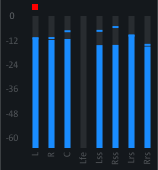
At the input and the output of the effect there is a peak meter section where you can check the input and output level of the channels. The number of peak meters displayed dynamically adjusts to the number of channels used by the plug-in. If clipping (level above 0 dB) has occurred in a channel, the red clipping indicator lights up. The indicator can be reset with a single click. |
Last modified on June 09, 2026
Was this page helpful?
What did you particularly like about this page?
What did you dislike about this page?
Thank you for your feedback.