Room
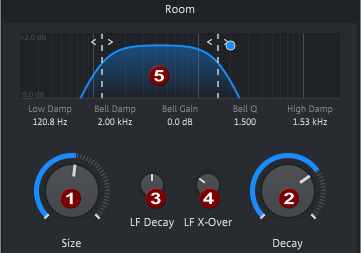
NOTE The value can also be entered numerically by clicking on the value under a control. Use the Tab key to move to the next value.
|
1 |
Size: Sets the room size and thus the timing of the early reflections. The larger the room, the more clearly separated the early reflections are perceived by the listener. NOTE In combination with the mixing ratio between early and late reflections, see the section on Color, which can be used to determine how far away the sound source appears. |
|
2 |
Decay: Determines the decay time, i.e. how often the signal is reflected between the "walls" of the virtual room and how much sound is absorbed in the process. |
|
3 |
LF Decay: Here you can set the factor (25%-400%) by which the decay time for the low frequencies should be shorter or longer. |
|
4 |
LF X-Over: Crossover frequency for the LF decay time. Determines at which crossover frequency the LF Decay is applied. |
|
5 |
Equalizer: With the equalizer you can influence the frequency behavior of the room reflections. Drag the two dashed lines to adjust the attenuation for the low and high frequencies. The blue dot controls a peak filter: the horizontal position determines the frequency, the vertical position the boost or cut by that frequency. Use the mouse wheel to adjust the resonance of the filter. |
Last modified on June 09, 2026
Was this page helpful?
What did you particularly like about this page?
What did you dislike about this page?
Thank you for your feedback.