Integrated Editing with Melodyne and SpectraLayers

Melodyne from Celemony Software is a software that lets you make extremely detailed edits of pitch, timing and spectrum of audio material, as well as change the melody of individual instruments within a complete mixes.

It was possible to use Melodyne in older versions of Sound Forge Pro as a VST plug-in. Starting from Sound Forge Pro 13, a special program interface from Melodyne (ARA2 = Audio Random Access) had been implemented, letting Melodyne be seamlessly integrated into Sound Forge Pro interface.

As Celemony opened the ARA2 program interface to use in other software than Melodyne, it is also possible to edit your audio in SpectraLayers. It comes also with a VST3 plug-in version of the program (starting from version 6) that makes use of the ARA2 interface.

PreparationClosed

To integrate Melodyne and SpectraLayers in your Sound Forge Pro workflow, make sure you installed the VST3 plug-in version of the software. The search path for VST3 plug-ins (usually C:\Program Files\Common Files\VST3\) has to be set as Alternate VST search folder in the Preferences, VST Effects tab.

Using MelodyneClosed

To edit an audio file or a selection of an audio file with Melodyne, chose Edit in Melodyne (ARA) from the Tools menu.

IMPORTANT Do not load the Melodyne VST plug-in into the Plug-in-chain via the Plug-in Chooser. Although it is listed there and will load into the chain, you will not have the integration features. You can recognize this by the fact that there's a transfer button in the Melodyne GUI then. But the aim of developing the ARA interface was to avoid the tedious process of transferring the audio data to the plug-in and letting it have access to the audio data in the host application directly.

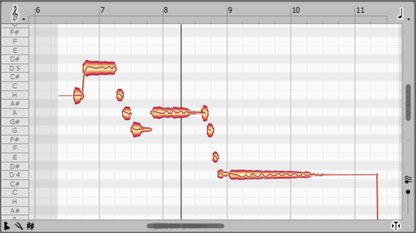
Melodyne will be loaded, the audio data will be analyzed and the Melodyne screen will be opened. There you will see the audio data as a typical Melodyne "blob".

The blob view is a mix of piano roll and waveform display.

You can copy, move, lengthen, shorten and play back all notes here. The scope of possible edits depends on the Melodyne version and spans pitch and timing changes up to detailed intonation control in polyphonic material and spectral editing of multiple tracks.

TIP Tip: To be able to use Melodyne to its full capacity, we recommend you watch the video tutorials on the Celemony website!

You can close the Melodyne plug-in window at any time, to show it again, click the Show Plug-In Window button at the Melodyne entry in the Plug-in Chain window

Using SpectraLayersClosed

You are probably already familiar using Sound Forge Pro and SpectraLayers together because there's already a workflow for this. Read everything about it under Editing with SpectraLayers

The advantage of using SpectraLayers with the ARA interface is that you don't have to save your file, SpectraLayers can be used like a real-time effect.

To edit an audio file or a selection of an audio file with the SpectraLayers plug-in, chose Edit in SpectraLayers (ARA) from the Tools menu.