Exporting DDP
This option lets you export CD projects that are compatible with DDP-CD mastering standards.
The Disc Description Protocol, DDP for short, is a proprietary format from DCA, Inc. widely used for delivering a CD image to a CD manufacturer in a digital form. A DDP image has the advantage that it cannot be affected by read errors, that may occur when a master CD is used. DDP files contain all parameters for the master CD, such as the exact distance between songs, crossfades and other information. This way you can be sure that the disc manufacturer receives consistent files.
To export a CD layout as DDP:
-
Choose DDP Export... from the Tools menu.
The menu entry is only available, if CD tracks are present in the file. Read more on CD layout creation under Creating Disc-at-Once (DAO) CDs
-
In the following dialog window, specify an export folder where all necessary files will be created.
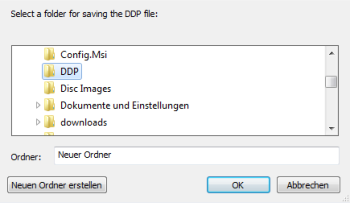
-
Click OK to export the files. Sound Forge Pro shows a message when the export was finished.
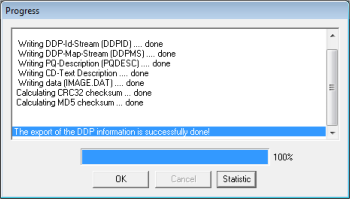
During exporting, the following files are created: DDPID (DDP ID stream), DDPMS (DDP map stream), Image DAT, and PQDESC (PQ description), CHECKSUM.TXT (CRC32), and CHECKSUM.MD5. Zip these before you send them to a CD manufacturer via FTP. If the manufacturer can unzip the files properly, you can be certain that the files are consistent.
The DDP ID stream (DDPID), the DDP map stream (DDPMS), the audio data (Image DAT), the PQ description (PQDESC), and the check sums CRC32 and MD5 can also be burned to DVD for delivery to the manufacturer with the note "Replica: CD-DA".
Last modified on October 20, 2026
Was this page helpful?
What did you particularly like about this page?
What did you dislike about this page?
Thank you for your feedback.