Interpolating Sound Data
From the Tools menu, choose Repair, and then choose Interpolate from the submenu to interpolate a region of sound based on the data at the beginning and end of the selection. This function is useful for repairing small glitches or clicks.
-
From the View menu, choose Zoom Time, and then choose In Full from the submenu.
-
Select the glitch. The selection should be very small (less than 2 ms in most cases).
If no selection is made, a glitch of less than one millisecond is assumed, and the cursor position is treated as the middle of the glitch.
-
From the Tools menu, choose Repair, and then choose Interpolate from the submenu. The beginning and end of the selection are connected with a straight line.
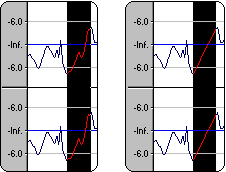
Use this method when a straight connect-the-dots technique is all that is required to remove the glitch. Otherwise, you may create another glitch.
Last modified on February 23, 2026
Was this page helpful?
What did you particularly like about this page?
What did you dislike about this page?
Thank you for your feedback.