Repairing Glitches, Clicks, and Noise
You can use Sound Forge Pro software to repair glitches, clicks, and surface noise in sound files.
There are some rather simple methods for this, where destroyed audio is replaced by other audio from the same source or from the other channel of a stereo file, or the missing audio data is interpolated.
For more sophisticated restoration tasks such as removing clipping, crackling and pops, hiss or noise, there are various plug-in solutions:
-
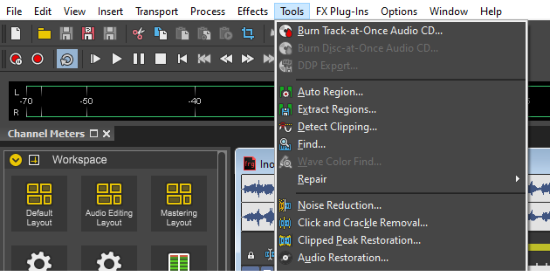
The classic Sound Forge Pro restoration plug-ins, which have been tried and tested for many years, can be accessed in the Tools menu via the corresponding commands
-
For the same use, with a more modern interface, there are the Sequoia restoration effects DeClicker/DeCrackler, DeClipper and DeHisser in the Effects menu.
-
You can also use the included plug-ins of the iZotope RX suite, which you can access via the FX Plug-In menu.
NOTE For information on handling these plug-ins, open the respective plug-in help via the ? button.
For particularly demanding tasks, the Sound Forge Pro Suite also includes the SpectraLayers program.
In this chapter
Last modified on May 05, 2026
Was this page helpful?
What did you particularly like about this page?
What did you dislike about this page?
Thank you for your feedback.