The Track List Window
From the View menu, choose Metadata, and then choose Track List to toggle the display of the Track List window.
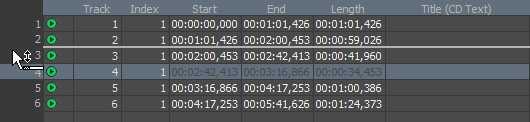
The Track List window is essentially a text representation of the events on the CD layout bar for a disc-at-once CD. You can use the Track List window to view track and index markers, edit track position and length, edit track names, adjust pause time, toggle protection and emphasis flags, and edit ISRC data.
You can also copy, save, and print the contents of the Track List window if you need to provide a track list to a CD duplicator.
Rearrange tracks

Edit track position
and length
Edit track title and
artist information
Adjust pause time
Toggle protection and
emphasis flags
Edit ISRC codes
Create a track list
(PQ list or cue sheet)
Last modified on June 09, 2026
Was this page helpful?
What did you particularly like about this page?
What did you dislike about this page?
Thank you for your feedback.