Event Envelopes
Event envelopes give you the ability to control an audio event’s volume, fade-in, and fade-out.
NOTE If you've upgraded from Acid 1.0 or 2.0 software, you'll notice that event envelopes behave differently in version 2026. Use track envelopes for panning, effects levels, effect automation, and when you want to create multiple envelope points.
Adjust an event's overall
level

 or Time Selection
  tool.
tool. ), drag the volume
line to the desired level. As you drag the volume line, the event’s gain
is displayed in dB.
), drag the volume
line to the desired level. As you drag the volume line, the event’s gain
is displayed in dB.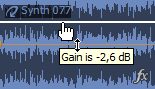
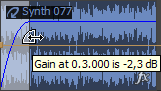
Fade an event in or out (fade offset)
 .
.
Change the fade curve type
Last modified on July 01, 2026
Was this page helpful?
What did you particularly like about this page?
What did you dislike about this page?
Thank you for your feedback.