Adding Audio Track Envelopes
With audio track envelopes, you can create fades, apply stereo panning, and add effects with parameters or send levels that change over time.
Track envelopes will always affect all events on the track. This means that any event envelopes will be calculated after the track envelopes.
To record track automation using the controls in the track header, select
the Automation Settings
button  . When Automation Settings
is not selected, the controls adjust static (trim) levels.
. When Automation Settings
is not selected, the controls adjust static (trim) levels.
TIP Tips:
-
Use event envelopes to control an event's level, fade-in, and fade-out.
-
You can use the Display tab in the Preferences dialog to change the colors used to draw track envelopes. Using custom envelope colors can help you avoid getting lost in a maze of envelopes when you're using track envelopes to control effects automation.
Apply mute automation

 in the track header to change the track's mute automation state
at the cursor position.
in the track header to change the track's mute automation state
at the cursor position. and
and  buttons in the track header. The mute state overrides the solo state:
 Add a volume or pan envelope
 in automation mode.
Add an assignable effects send envelope
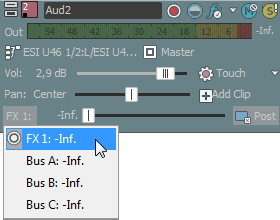
Add a bus send envelope
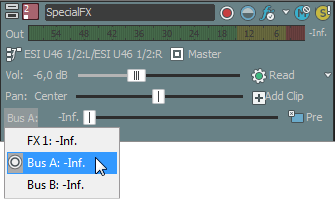
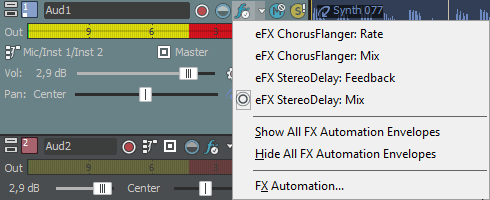
Add an effect automation
envelope
Hide envelopes

Lock envelopes to events
Last modified on July 09, 2026
Was this page helpful?
What did you particularly like about this page?
What did you dislike about this page?
Thank you for your feedback.