From the Options menu, choose Metronome (or click the button on
the transport bar) to turn the metronome on or off.
When you start recording
or playing your project,
the metronome will start playing the project tempo and will follow any
tempo or time signature
changes. For example, if you start recording at measure 20 and your project
tempo changes at that measure is 160 BPM, the metronome will play at 160
BPM.
The metronome sounds are created by the general MIDI sound
set, and the volume of the metronome is determined using the Preview
fader in the Mixing Console.
NOTE Notes:
The metronome’s sound is not mixed
in the final rendering of the project.
Before rendering from a ReWire
mixer application, turn off the Acid metronome, or the metronome will
be included in the rendered output.
TIP The metronome will not follow grooves
that you've applied to your project. If you want to hear a grooved metronome,
use a simple click loop and apply the desired groove to the track.
Metronome countoff allows you to use the metronome to count
off a set number of bars before beginning recording or playback in the
same way a drummer counts off with her sticks before the band starts playing.
From the Options menu, choose Enable Metronome Countoff (or click the button on the transport
toolbar) to turn metronome countoff on or off.
You can click the down arrow next to the button to set countoff
options:
Item
Description
Enable Metronome Countoff
Turns countoff on or off.
Countoff Always On
Metronome counts off during playback and recording.
Countoff Only During Playback
Metronome counts off during playback only.
When countoff is turned on for playback only,
the button will display a play icon:
Countoff Only During Recording
Metronome counts off during recording only.
When countoff is turned on for recording only,
the button will display a record icon:
One-Bar Countoff
Sets the number of measures before the cursor
position the metronome will count off.
TIP Countoff always uses the tempo at the cursor position.
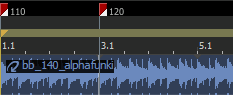
In the following example, if you positioned the cursor at measure three
and choose Two-Bar Countoff, the
metronome would count off for two measures at 120 BPM before reaching
the cursor position:
TIP
Two-Bar Countoff
Four-Bar Countoff
Configure Metronome
Displays the Audio
tab in the Preferences dialog, where you can choose a metronone sound.