Using a Control Surface
A control surface is a hardware device that uses knobs, faders, and buttons to control user interface elements that are normally controlled with a mouse. Using a control surface lends a tactile feel to your editing sessions.
Unlike keyboard shortcutswhich determine the shortcut's behavior based on the portion of the Acid window that has focusa control surface's mapped functions work no matter what part of the application has focus. ——
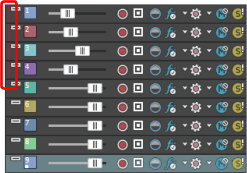
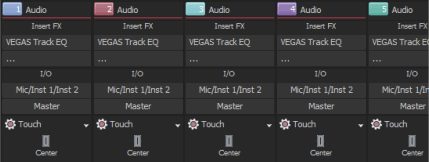
When your control surface is enabled, an indicator is displayed in the track list and the Mixing Console to show which channels are under external control. Multiple bars are displayed if a channel is under the control of multiple devices.
|
|
|
|
In the track list, vertical bars in tracks 1-4 indicate that those tracks are under external control. |
In the Mixing Console window, horizontal bars at the top of channels 1-4 indicate which channels are under external control. |
Connect your control surface
Configure Acid to use your control surface
Configure or customize your control surface
Use your control surface
 for each track you want to edit with the control surface
and choose
for each track you want to edit with the control surface
and choose Last modified on July 09, 2026
Was this page helpful?
What did you particularly like about this page?
What did you dislike about this page?
Thank you for your feedback.