Brilliance Enhancer
Note: This effect is part of the Cleaning & Restoration Suite. In full functionality, this suite is only included in Samplitude ProX Suite. In Samplitude, these effects have a simplified interface with limited functionality.
With the Brilliance Enhancer you can compensate for sound losses in the high frequencies and give the audio material a silky sheen.
Such losses occur with MP3 compression or with old tape recordings. Unlike an equalizer, which only boosts existing frequencies, the Brilliance Enhancer calculates new harmonics from the existing signal and thus noticeably freshens up the sound. You can also use the Brilliance Enhancer well in pop or rock as a mastering effect if you want to increase transparency and brilliance of the sound.
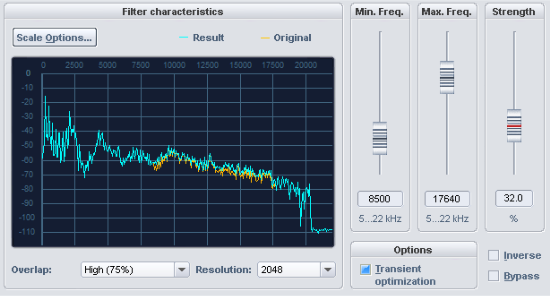
In the filter graph there are two curves, the orange curve for the original signal and the blue curve for the processed signal.
With the scale optionsyou can adapt the signal display to your needs. The options correspond to those in the FFT filter
Overlap: This parameter controls the overlap of the time windows for the calculations of the spectrum. Higher values improve the result, but also increase CPU load.
Resolution: With this parameter you can select the internal resolution of the algorithm. Higher resolutions do not automatically mean better results - the optimal setting depends on the audio signal.
Use Minimum frequency and Maximum frequency to set the lower limit and upper limit of the frequency range to be enriched with new harmonics. Strength determines the intensity with which the new harmonics are added.
Options:
-
Transient optimization: If this option is activated, transients will be freshened up by the addition of higher frequencies. Older or compressed pop and jazz recordings benefit especially from this setting. The setting is less suitable for tonal material, as odd harmonics can be generated.
-
Inverse: If this switch is activated, you will only hear the newly generated harmonics that are added.
-
Bypass: This allows you to temporarily disable the effect in order to compare the unprocessed signal with the processed signal.