DeClipper
Note: This effect is part of the Cleaning & Restoration Suite. In full functionality, this suite is only included in Samplitude ProX Suite. In Samplitude, these effects have a simplified interface with limited functionality.
The DeClipper is a tool for removing overmodulation and distortions. Overmodulated passages are recalculated, or interpolated, based on the material immediately surrounding them.
The de-clipping algorithm is suitable for material featuring clearly audible overmodulation, e.g. distorted piano or vocals.
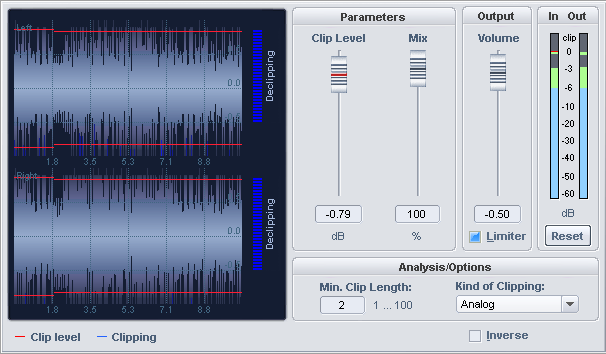
Signal display
The signal display shows you the edited material as a continuous waveform. The Clip level is shown as a red limiting line. You can see from the blue markings where the DeClipper has been applied. The meter to the right of the waveform display also shows the intervention of the effect.
Settings and Controls
| Parameters | Feature |
| Clip level | Here you specify the level at which the algorithm considers samples to be overdriven and corrects them if necessary. |
| Mix | Use this parameter to set the intensity of the reduction in % at which the DeClipper alters the audio material. |
| Volume | This setting makes it possible to lower the output level, because the corrected output will tend to be a bit louder than the input signal as a result of waveform interpolation. |
| Limiter | This option limits the peaks that exceed the maximum level. Level peaks higher than the maximum value can be caused by interpolation. |
| Reset | Set the peak meters to its original position here. |
Analysis/Options
| Parameters | Feature |
| Min. clip length | Set the minimum count of consecutive overmodulated samples for clipping detection. |
| Kind of clipping | Optimizes clipping detection by setting the applicable setting for the material – Analog, Digital or Analog + Digital. |
| Inverse | If is activated, only the part of the signal that is changed by the algorithm will be audible. |
|
Bypass |
This allows you to temporarily disable the effect in order to compare the unprocessed signal with the processed signal. |
Possible Applications
-
Some DAT recorders have a protective analog switch, so that the level never reaches the digital mains (0 dB). In this case, a value of -0.5 dB or less is suitable.
-
With an input of, for example, -6 dB, all samples above half the control level are registered as overmodulated and recalculated. In this way, an analog damaged signal can be repaired.