Loudness meter
This function is only available in Samplitude ProX Suite.
Loudness is the subjective perception of volume when listening to audio material. This sense varies among listeners, depending on several listening conditions such as level, music style, age and even psychological state.
The EBU Recommendation R128 is a standard for the standardized measurement of loudness with the aim of harmonizing audio productions and level measurements. R128 is based on the ITU-R BS.1770 standard which was established by the International Telecommunications Union.
The core of the measurement of the average loudness impression is the integrated loudness, averaged over the entire duration of the playback. For standardized loudness, the audio material is normalized to a target value of -23 LUFS according to EBU R128.
If compression is applied in the master, files may be created whose true peak level is slightly or even significantly below the maximum level. In this case, to take full advantage of the dynamic range of the files, the compression must be adjusted to reach the target loudness value.
By switching to leveling and normalizing by loudness, a consistent loudness level can be achieved that can be maintained throughout the production chain. The end result is an even loudness impression for the listener and audio material that contains fewer artifacts caused by excessive dynamic compression.
EBU Recommendation R128 pays special attention to three parameters that are essential for the characteristics of an audio signal:
-
Program Loudness - Program Loudness: Long-term integrated loudness over the duration of the audio material - measured in LUFS (Loudness Units, referenced to Full Scale) or in LU (referenced to a target value, e.g. -23 LUFS according to EBU R128). This parameter indicates the average program loudness. It calculates the mean value over the length of the piece.
The LU indicator is the level difference to the target value. For example, a measured value of -20 LUFS corresponds to 3LU difference to a target value of -23 LUFS. The graphic display for the relative program loudness in LU would show +3 in this case.
-
Maximum True Peak: The maximum value of the audio signal when measured continuously on the time axis in dBTP. When converting digital signals into analog signals, level peaks may occur which were previously not displayed. Therefore the peak level of a true peak meter is typically shown above that of conventional digital meter (Quasi Peak Program Meter - QPPM). The R 128 standard permits a maximum True Peak Value of -1dBTP.
-
Loudness Range (LRA): Value changes in the loudness measurements of the audio material - measured in LU (Loudness Units). This value shows the difference between loudest and quietest measured value (silence excluded).
The combination of these parameters allow more dynamic mixes without affecting the loudness.
Momentary and Short Term are other measures of loudness with shorter integration times (3s for Momentary, 400ms for Short Term) that can be used to assess the loudness of individual sound events.
Further information about EBU Recommendation R128 can be found in the Wikipedia!
Loudness meter - Parameters
In the context menu of the graphical display you can select via "Presets" whether the absolute value in LUFS or the relative value to the reference value in LU should be displayed.
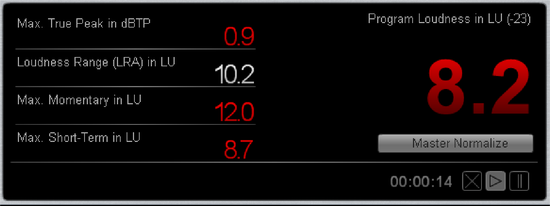
Program loudness in LU: Relative program loudness for the "Integrated Loudness" in loudness units (LU).
Program loudness in LUFS: Absolute program loudness for the "Integrated Loudness" in loudness units (LUFS).
The program loudness is displayed either in LU or LUFS, depending on the selected preset relative/absolute.
Maximum True Peak in dBTP: Peak level of the audio signal when measured continuously on the time axis in dBTP.
Loudness Range in LU: Loudness range measured in LU as a relative value.
Max. Momentary /Max. Short: Loudness values for the "Momentary" measurement and the "Short" measurement according to the set measuring lengths.
Measurement duration: Time information for the duration of the loudness measurement so far. You can pause the measurement with the Pause button and continue it with the Play button. Pressing the reset button (X symbol) resets all display values.
The button Master Normalize adjusts the volume of the master so that the measured loudness corresponds to the target value. So, for example, if the measured program loudness is 4 LU, the master volume will be decreased by 4dB.
Loudness Meter - Settings
Basic settings
With Loudness standard you set the standard the loudness meter should follow. If you select User as the loudness standard, you can freely adjust all parameters. If, on the other hand, you select EBU R128 or ITU-R BS. 1771, the parameters are preset according to the selected standard. Parameters prescribed by the standard are grayed out and cannot be changed.
Specified for EBU R128 is the target loudness -23 LUFS. This level represents the default value for content production in broadcasting.
Clipping Threshold: Set the clipping level, i.e. from what point clipping should be indicated. This value is prescribed to -1dB for EBU R128. This leads to the fact that, for example, a measured True Peak peak level of -0.8 dBTP is already displayed as clipped.
Automatic reset after play start: With this option you reset the measurement every time you start playback. This option corresponds to the "Reset" button  in the display.
Loudness Scale
In the tab Loudness scale you can select different standardized scales. This also defines the value range of the display. For example, the entry EBU R128 +9 means that the scaling display extends to +9 LU. At Scale range you can set the limits of the LU scales individually.
At Color Settings you can define color codes as well as threshold values for the overdriven range, the tolerance range around the target value, the normal range and the undermodulated range.
Measurement Parameters
In the Measurement Parameters tab you can set the time parameters for the Momentary measurement and Short measurement, the gate thresholds for the Integrated measurement, and the lower and upper limits of the Loudness Range (LRA) measurement. The specified default values for EBU R128 are especially marked.
These standardized values are initially locked to prevent them from being changed accidentally. They can only be changed if you first select default at Preset.
In case of a future change of the standards and additional requirements of the broadcasters, you can adjust the affected values here and save them as new presets. Absolute and relative values are displayed in relation to the selected scale. L or LK denote relative scales, LUFS and LKFS denote absolute scales.