General
Here you can change the default behavior of effects and effect windows:
-
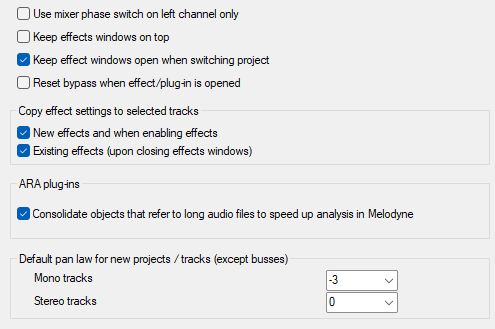
Use mixer phase switch only on left channel: By default, the phase button in Mixer and Track editor inverts the phases of both stereo channels. You can change this behavior here to use this switch to correct the classic inverted phase error that occur with incorrect wiring and that often affect only one stereo channel.
-
Keep effects windows on top: Effects windows are displayed above all other windows in the system and remain visible even if you bring other programs to the foreground. However, when minimizing the Sequoia program window, they are also minimized.
-
Keep effect windows open when switching project: When you switch to another project, open effect windows are closed. If the option is active, they remain open.
-
Reset bypass when effect/plug-in is opened: If the option is enabled, deactivated effects will be activated as soon as you open their windows.
-
Copy effect settings to selected tracks: see Apply effect to multiple channels simultaneously.
-
Consolidate objects that refer to long audio files to speed up the analysis in Melodyne: Activate this option so that Sequoia only transfers the audio ranges actually used by Melodyne instead of loading the entire original file. This shortens the analysis time, reduces the CPU and memory load, and prevents automatic freezing of large audio files during ARA2 processing.
-
Default pan law for new projects / tracks (except buses): Here you can define the pan law that will be applied when creating new mono or stereo tracks (in new projects and when adding individual tracks). For more information, see the Panorama editor.