Loop Tuner
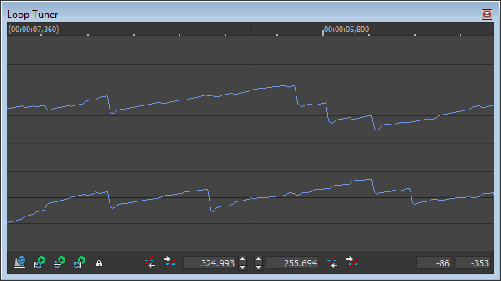
From the View menu, choose Loop Tuner to open or close the Loop Tuner window. You can use the Loop Tuner to adjust the starting and ending points of a loop (or selection) to create smooth transitions.
The Loop Tuner allows you to view both loop endpoints at once. The left-hand side of the Loop Tuner window shows the end of the loop, while the right-hand side shows the start of the loop. A seamless loop will not have any discontinuities; the waveform should look smooth as it goes from the end of the loop back to the start.
Learn more about looping
techniques

Play from the Loop
Tuner
 to play the sound data before the selected
loop.
to play the sound data before the selected
loop.
 to play the selected loop. You can use the
Loop Tuner to tune the loop during playback.
to play the selected loop. You can use the
Loop Tuner to tune the loop during playback.
 to play the sound data after the selected
loop.
to play the sound data after the selected
loop.
Switch between sustaining
and release loops
 to switch between the sustaining and release
loops in the Loop Tuner.
to switch between the sustaining and release
loops in the Loop Tuner. .
.Fine-tune loop endpoints
 display the current positions (in samples)
of the endpoints. Use the spin controls to adjust the end points.
display the current positions (in samples)
of the endpoints. Use the spin controls to adjust the end points.
Move the end points
to a zero-crossing
 to move the endpoint to the previous zero-crossing.
 to move the endpoint to the next zero-crossing.
Lock a loop length
 if you want to shift a loop’s position without
changing its length. When this button is selected, any operation you use
to change a loop point affects both the start and end of the loop, therefore
keeping the loop length constant.
if you want to shift a loop’s position without
changing its length. When this button is selected, any operation you use
to change a loop point affects both the start and end of the loop, therefore
keeping the loop length constant.Save loop points
Last modified on February 23, 2026
Was this page helpful?
What did you particularly like about this page?
What did you dislike about this page?
Thank you for your feedback.