Video tutorial
Dynamic render output filenames
Use filename tokens in the Render dialog to build output filenames from project properties and render settings. Tokens reduce manual naming work and keep repeated renders consistent. Use them for deliveries, review files, archives, and versioned outputs.
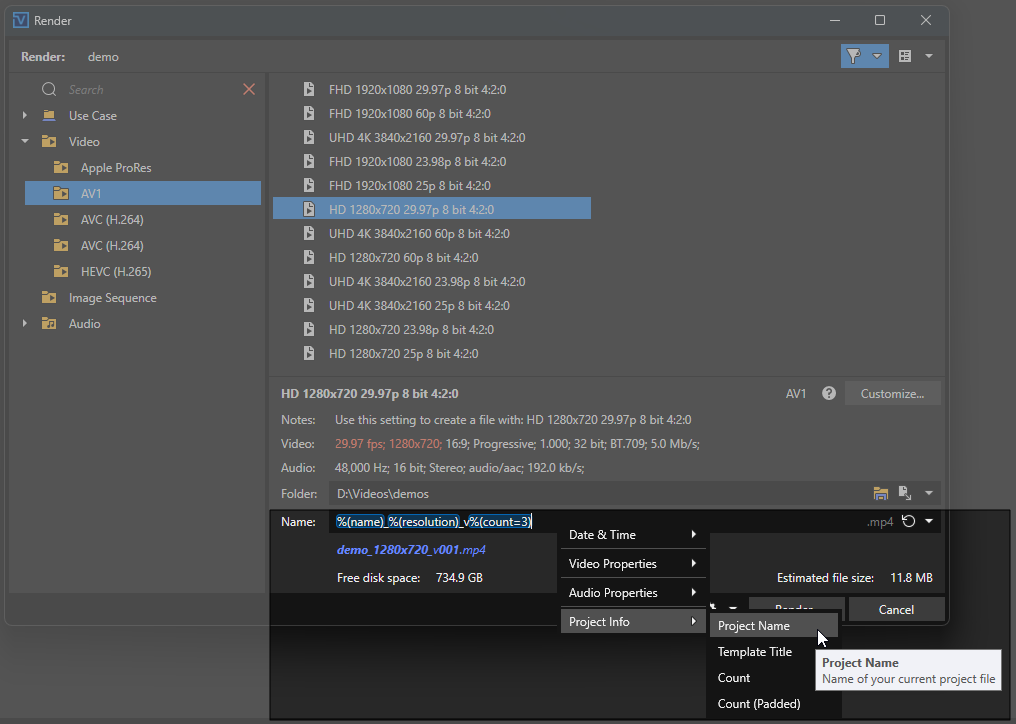
FIGURE Filename tokens and live filename preview
Filename tokens
A token is a short placeholder for project or render information. It uses the form %(token) or %(token=option). When rendering starts, each token is replaced with its current value.
Instead of entering a static name such as MyVideo_Final, add tokens to the Name box.
Combine tokens with fixed text, spaces, hyphens, or underscores.
|
Filename format |
Rendered output filename |
|---|---|
|
|
|
|
|
|
|
|
|
A live preview appears below the Name box when the filename contains a valid token. Token placeholders are highlighted in the Name box.
Insert filename tokens
-
From the File menu, choose Render.
-
Select an output format and render template.
-
Add a token to the Name box using one of these methods:
-
Type the token directly at the required position.
-
Use the context menu:
-
Place the cursor at the required insertion position in the Name box.
-
Right-click the Name box.
-
Choose a category, and then select a token.
The token appears at the current cursor position.
-
-
-
Add other tokens or fixed text as required.
-
Review the live filename preview.
-
Click Render.
The rendered file uses the resolved filename shown in the preview.
Filename token context menu
Right-click the Name box to open the filename token context menu. The menu groups common tokens into 4 categories.
|
Category |
Available entries |
|---|---|
|
Date & Time |
|
|
Video Properties |
|
|
Audio Properties |
|
|
Project Info |
|
Selecting an entry inserts its token at the current cursor position.
Filename token reference
Token syntax
Use %(token) without an option. Use %(token=option) to control the token output.
-
Token names are case-insensitive. For example,
%(FPS),%(fps), and%(Fps)are identical. -
The option after
=fine-tunes the output. It can control units, formatting, padding, or the value source. -
Most tokens have a useful default when used without an option.
-
A known token whose value is unavailable resolves to
??. The preview displays??when it is visible. This can occur before you select a render template. Vegas Pro replaces??with the resolved value after you select a template.
Date and time
Use %(time=format) to insert the current date or time when rendering starts. The option uses .NET custom date and time format strings.
|
Token |
Example output |
Description |
|---|---|---|
|
|
|
Date in ISO order |
|
|
|
Time in 24-hour format |
|
|
|
Date and time |
|
|
|
Localized full month name |
|
|
|
4-digit year |
|
|
|
Zero-padded month number |
|
|
|
Zero-padded day |
|
|
|
Localized abbreviated weekday |
TIP Use hyphens or underscores instead of colons or slashes. Colons and slashes are not valid in Windows filenames. For example, use %(time=HH-mm-ss) instead of %(time=HH:mm:ss). Use %(time=yyyy-MM-dd) instead of %(time=yyyy/MM/dd).
Frame rate and video dimensions
These tokens use the selected render template by default. The =project option uses project properties.
|
Token |
Example output |
Description |
|---|---|---|
|
|
|
Render-template frame rate |
|
|
|
Project frame rate |
|
|
|
Render-template width and height |
|
|
|
Project width and height |
|
|
|
Separate render-template dimensions |
|
|
|
Separate project dimensions |
NOTE If the render template has no explicit resolution, %(resolution), %(width), and %(height) use the project dimensions.
Video bitrate and aspect ratios
videobps is an alias for vbps. aspectratio is an alias for ratio.
|
Token |
Example output |
Description |
|---|---|---|
|
|
|
Raw video bitrate in bits per second |
|
|
|
Kilobits per second |
|
|
|
Megabits per second |
|
|
|
Raw value divided by 1000 |
|
|
|
.NET format string (integer) |
|
|
|
.NET numeric format string |
|
|
|
Display aspect ratio |
|
|
|
Display-aspect numerator |
|
|
|
Display-aspect denominator |
TIP Use %(vbps=mbps) for a readable bitrate. Add Mbps as fixed text, for example %(vbps=mbps)Mbps → 10.0Mbps.
Video format properties
pixelaspect, fieldorder, hdrmode, and colorspace are long-form aliases.
|
Token |
Example output |
Description |
|---|---|---|
|
|
|
Render-template pixel aspect ratio |
|
|
|
Project pixel aspect ratio |
|
|
|
Render-template field order |
|
|
|
Project field order |
|
|
|
Render-template HDR mode |
|
|
|
Project HDR mode |
|
|
|
Render-template color space |
Common field-order outputs are Progressive, Upper field first, and Lower field first. HDR mode outputs are SDR, HLG, and HDR10.
Audio properties
Audio tokens use the selected render template by default. Add =project where supported to use project properties.
|
Token and aliases |
Example output |
Description |
|---|---|---|
|
|
|
Render-template channel layout |
|
|
|
Project master-bus mode |
|
|
|
Audio codec |
|
|
|
Sample rate in hertz |
|
|
|
Sample rate in kilohertz |
|
|
|
Raw value divided by 1000 |
|
|
|
.NET numeric format string |
|
|
|
Render-template audio bit depth |
|
|
|
Project audio bit depth |
Common render-template channel layouts include Mono, Stereo, 5.1 Surround, and 7.1 Surround.
Audio bitrate
bps and abps are aliases for audiobps.
|
Token |
Example output |
Description |
|---|---|---|
|
|
|
Raw audio bitrate in bits per second |
|
|
|
Kilobits per second |
|
|
|
Megabits per second |
|
|
|
Raw value divided by 1000 |
Project information
|
Token |
Example output |
Description |
|---|---|---|
|
|
|
Project filename without its extension |
|
|
|
Selected render-template title |
|
|
|
Project name, same as |
Version and count
version and count are equivalent. The tokens scan the selected output folder for files that match the current filename pattern.
All formatting options work with either token name.
|
Token |
Example output |
Description |
|---|---|---|
|
|
|
Plain version number |
|
|
|
Same as |
|
|
|
Version number padded to 3 digits |
|
|
|
Version number padded to 2 digits |
|
|
|
Version number padded to 4 digits |
|
|
|
Version number padded to 5 digits |
|
|
|
.NET numeric format string |
If no matching files exist, the counter starts at 1. If matching filenames end at v003, the next render uses v004.
TIP Use %(version=padded) for filenames that you sort alphabetically. Without padding, values sort as 1, 10, and 2.
NOTE The counter is stored across sessions. Vegas Pro remembers the last used version if you rename or delete matching files.
Practical filename examples
Standard delivery
Filename format: %(time=yyyy-MM-dd) %(name) - %(resolution) %(fps)fps %(hdr)
Example result: 2026-09-24 MyProject - 1920x1080 30.0fps SDR
Versioned render
Filename format: %(name)_
Example result: MyProject_
Technical archive
Filename format: %(name)_
Example result: MyProject_
Daily review
Filename format: %(time=yyyy-MM-dd_HH-mm) Review %(name)
Example result: 2026-09-24_14-35 Review MyProject
Template-named batch render
Filename format: %(name)_
Example result: MyProject_
Filename token notes
-
Unknown tokens, such as
%(xyz), remain as token placeholders in the output filename. -
Avoid Windows-reserved filename characters:
/ \ : * ? " < > |. -
Aliases are equivalent to their corresponding token names.
-
Tokens use render-template values by default. Add
=projectwhere supported to use the corresponding project property.
More information
Last modified on September 14, 2026
Was this page helpful?
What did you particularly like about this page?
What did you dislike about this page?
Thank you for your feedback.