Channel Converter
From the Process menu, choose Channel Converter to change the number of channels in an audio file. The Channel Converter dialog can also be used to reverse the channels of a stereo file or intermix the channels of a multichannel file to create interesting panning effects.
TIP To perform quick channel conversion without specifying the mix, use the Audio channels box on the File Properties window or right-click the Channels box in the status bar and choose a setting from the shortcut menu.
Notes:
-
If you want to apply a panning envelope to a mono file, use the Channel Converter to convert the file to stereo first.
-
You can use mono files in the Pan/Expand dialog if you choose Pan (preserve stereo separation) or Pan (mix channels before panning) from the Process mode drop-down list. When you click OK to apply your changes, the file will be converted to stereo and your panning settings will be applied.
For more information about using processing dialog controls, click here.
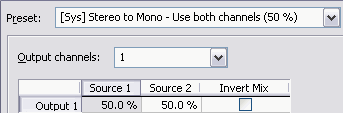
Convert a stereo file
to mono

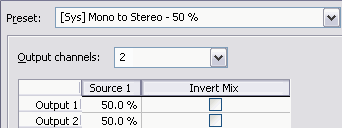
Convert a mono file
to stereo (or multichannel)
Intermix channels in
a file
Swap stereo channels
Last modified on February 24, 2026
Was this page helpful?
What did you particularly like about this page?
What did you dislike about this page?
Thank you for your feedback.