Processing Musical Instrument Files
Sound Forge Pro can open and save DLS, GigaStudio/GigaSampler, and SoundFont
2.0 musical instrument files, allowing you to add effects and processing
to existing samples and edit individual samples.
When you open a musical instrument file, you'll notice some additions
to the data window:
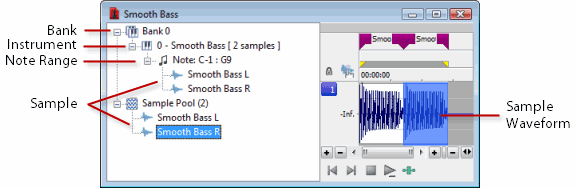
The left pane lists the banks, instruments, note ranges, and recorded
samples in the instrument file. Click a bank or sample to select it in
the waveform display.
Markers  represent each sample in the waveform display.
File Properties metadata cannot
be edited for musical instrument files.
You can open musical instrument files just like any other
file type:
-
Drag a musical instrument file to
the workspace.
-
From the File menu, choose Open,
and then use the Open dialog to browse to the file you want to open.
-
Double-click an instrument file in
the Sound Forge Pro Explorer window.
The following musical instrument file formats are supported:
-
.dls:
DLS level 1.0 and 2.0
-
.sf2:
SoundFont version 2.0
-
.gig: GigaSampler/GigaStudio version
1/2/3
Compressed and encrypted GigaSampler/GigaStudio samples are not
supported.
If you want to open a sample's audio data, browse to an
instrument file in the Explorer window. Click
the down arrow  next to the Views
button
next to the Views
button  and choose Region
View from the menu.
and choose Region
View from the menu.
Each wave is then displayed at the bottom of the Explorer
window. You can double-click a wave to open it as a wave file:
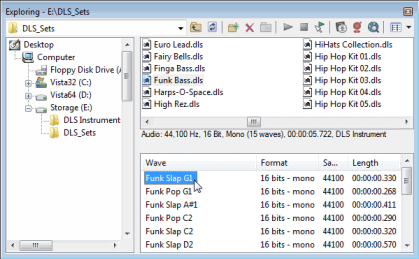
Playback for musical instrument files behaves slightly differently
than playback in a normal data window.
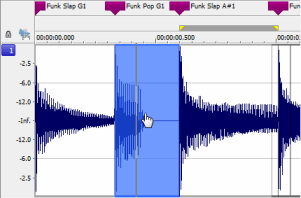
Each sample in an instrument file is contained within an
event in the data window. The data window selection determines which parts
of the waveform will be processed.
Event positions are locked; you cannot move events within
the data window.
Effects and processes can be applied to individual events
or multiple selected events.
You can select an individual sample by clicking the event
in the data window (hold Ctrl or Shift to select multiple samples):
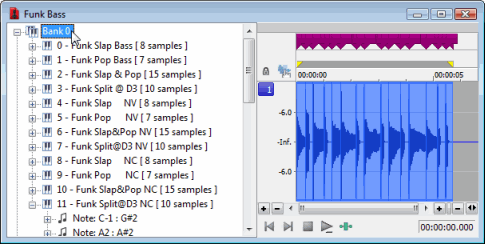
You can select all samples in a bank by clicking the bank
in the left pane:
You can select all of an instrument's samples by clicking
the instrument in the left pane:
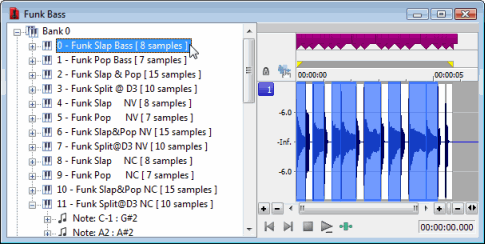
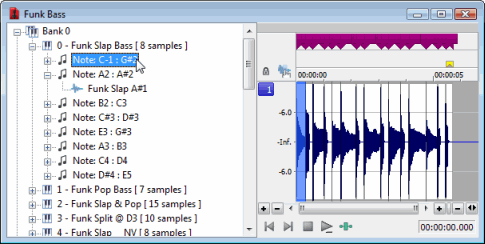
You can select all samples within a note range by clicking
the note range in the left pane:
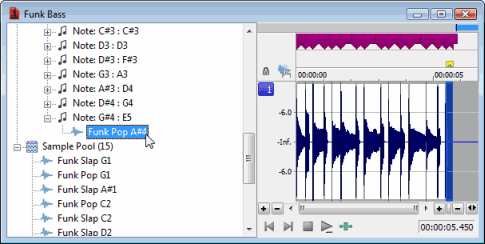
You can select individual samples by expanding a note range
or the Sample Pool list and clicking a sample in the left pane:
-
Select the samples you want
to process. If no samples are selected, processing will be applied to
all samples.
-
Choose a command
from the Process, Effects, or FX Plug-Ins menu.
-
Choose a preset from the
Preset drop-down
list or adjust the dialog controls as needed.
For more information, please see Using
Processing Dialogs.
Plug-ins that can change the length of audio data (such as reverb
or delay) will use Insert Tail Data mode. Tails will be added to the waveform,
and audio to the right of the tail will be moved to accommodate the extra
audio.
-
Click the Preview button to
hear the effects of your processing settings. Select the Bypass
check box to hear the unprocessed signal.
-
Click OK.
During processing, a progress meter is displayed at the bottom of the
data window. You can cancel the operation at any time by clicking the
Cancel button
to the left of the progress meter, or you can press the Escape key.
Event selection is not exposed to scripts. When applying an effect
to a file via scripting, you can
specify the current time/channel-selection (DoMenu) or a new time/channel-selection
(DoEffect).
When processing musical instrument files, all events in the time/channel
selection will be processed. If no selection exists or the entire file
is selected, all events will be processed.
In addition to applying processing and effects, you can
also edit the samples in an instrument file.
For example, if you need to remove a glitch
or replace a sample in an instrument file, you can open an individual
sample in a new editing window.
-
Select the sample you want to edit.
-
From the Edit menu, choose Event, and then choose
Edit from the
submenu. The selected sample is opened in a new window. If you selected multiple
samples in step 1, each sample is opened in a separate window.
TIP
Press E (or right-click a sample and choose Edit
from the submenu) to open the edit window quickly.
-
Perform edits as needed.
NOTE
Notes:
-
If you want to replace sample data,
you can clear the data in the edit window
and paste data from another window.
-
Changes to bit depth, sample rate,
or number of channels cannot be saved back to the original musical instrument
file.
-
From the File menu, choose
Save to close
the edit window and save your changes back to the musical instrument file. If you want to save the edited sample to a different format (other
than a musical instrument file), you can use Save
As.
After you're finished processing a musical instrument file,
you can use the Save or Save
As commands to save your changes to the original file or to a new
file.
Musical instrument files must be saved to the original format.

 to play all samples in the data window. Click
  to play all samples from the cursor position to the end of the data window.