Adding MIDI Files to a Project
Adding MIDI files to your Acid project is just like adding audio: you can double-click a MIDI file to create new tracks and events, or you can drag a MIDI file to an existing track's Paint Clip Selector button to add a new clip.
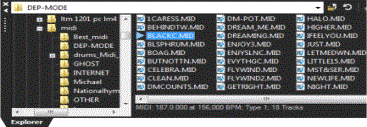
NOTE When you select a MIDI file in the Explorer window, its length, tempo, type, and number of tracks are displayed at the bottom of the window:
NOTE
When you right-click a MIDI file in the Explorer window, you can choose how you want to add it to your project:
|
Command |
Description |
|
Add to Project |
Adds the file to the current Acid project and adds tracks to the track list. No events are created.
TIP When you draw events after adding a file to your Acid project, MIDI controller data is not added to the timeline. Right-click an event and choose Merge Envelope Data from the shortcut menu to represent MIDI controllers as envelopes on the timeline. |
|
Add to Project with Events
|
Adds the file to the current Acid project at the cursor position, adds tracks to the track list, and creates events for the MIDI note data on each track. Envelopes are added to the tracks to represent MIDI controller data.
|
|
Add to Project with Events Rippled
|
Adds the file to the current Acid project at the cursor position, adds tracks to the track list, and creates events. Existing events are shifted downstream to make room for your MIDI file. Envelopes are added to the tracks to represent MIDI controller data.
|
|
Open as New Project |
Starts a new project, adds tracks to the track list, and creates events for the MIDI note data on each track:
TIP When you draw events after opening a MIDI file as a new project, MIDI controller data is not added to the timeline. Right-click an event and choose Create Envelopes from Clip from the shortcut menu to represent MIDI controllers as envelopes on the timeline. |
Last modified on July 09, 2026
Was this page helpful?
What did you particularly like about this page?
What did you dislike about this page?
Thank you for your feedback.