Overview
|
1 |
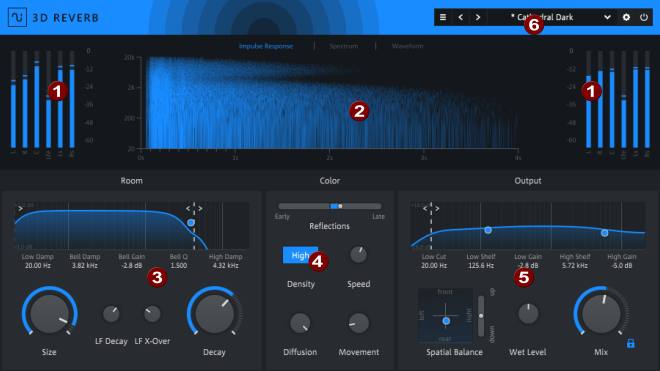
Peak meter: The peak meters for the input and output signal are located at the top left and right. »For more information, see Peak Meter |
|
2 |
Visualization: There are three different views for visualizing the generated reverb signal: impulse response, spectrum or waveform display. »For more information, see Visualization |
|
3 |
Room: This is where you'll find the controls for editing the early reflections, which include an equalizer for attenuating reflections and controls for room size and decay time. »For more information, see Room |
|
4 |
Color: Here you can access the controls for the sound processing of the late reflections as well as a crossfader for adjusting the mixing ratio between early and late reflections.»For more information, see Color |
|
5 |
Output: This is where you'll find the controls for processing the output signal: an equalizer, the Spatial Balance control for positioning in 3D space, and the controls for output level and mixing between dry and reverberated signals. »For more information, see Output |
|
6 |
Presets and Settings: In the Presets and settings area, you can load presets and also access additional settings and the bypass function. »For more information, see Presets and Settings |
Last modified on June 09, 2026
Was this page helpful?
What did you particularly like about this page?
What did you dislike about this page?
Thank you for your feedback.